
Restore from trash
Deleting in Ronja is not final. Deleted items move to the trash and stay restorable for 30 days before they’re permanently purged. That covers access groups, features, tables, workflows, notes, secrets, MCP servers, apps, connectors, automations, Saved Agents, and managed databases — including a database’s dev copy, which lands here when you discard it.
Restore from the Trash page (admins)
Section titled “Restore from the Trash page (admins)”- Open Trash in the admin area (
/data-studio/trash). The trash is organization-wide: if your organization has more than one Space, it lists deleted items from every one of them, so you never have to guess which Space something was in to get it back. - Find the item in its section. Every section has a Purges in column counting down: “N days left”, then “Nh left”, “less than an hour left”, and finally “purging on next sweep”.
- Click Restore. The item comes back — including its automations.
A deleted item’s name is free while it’s in the trash, so something else can take it. If that happened, a restored table or feature comes back under a slightly different name — its own name with a short code after it, like Orders (k3m9pq) — rather than being stuck in the trash. Rename it to whatever you want once it’s back.
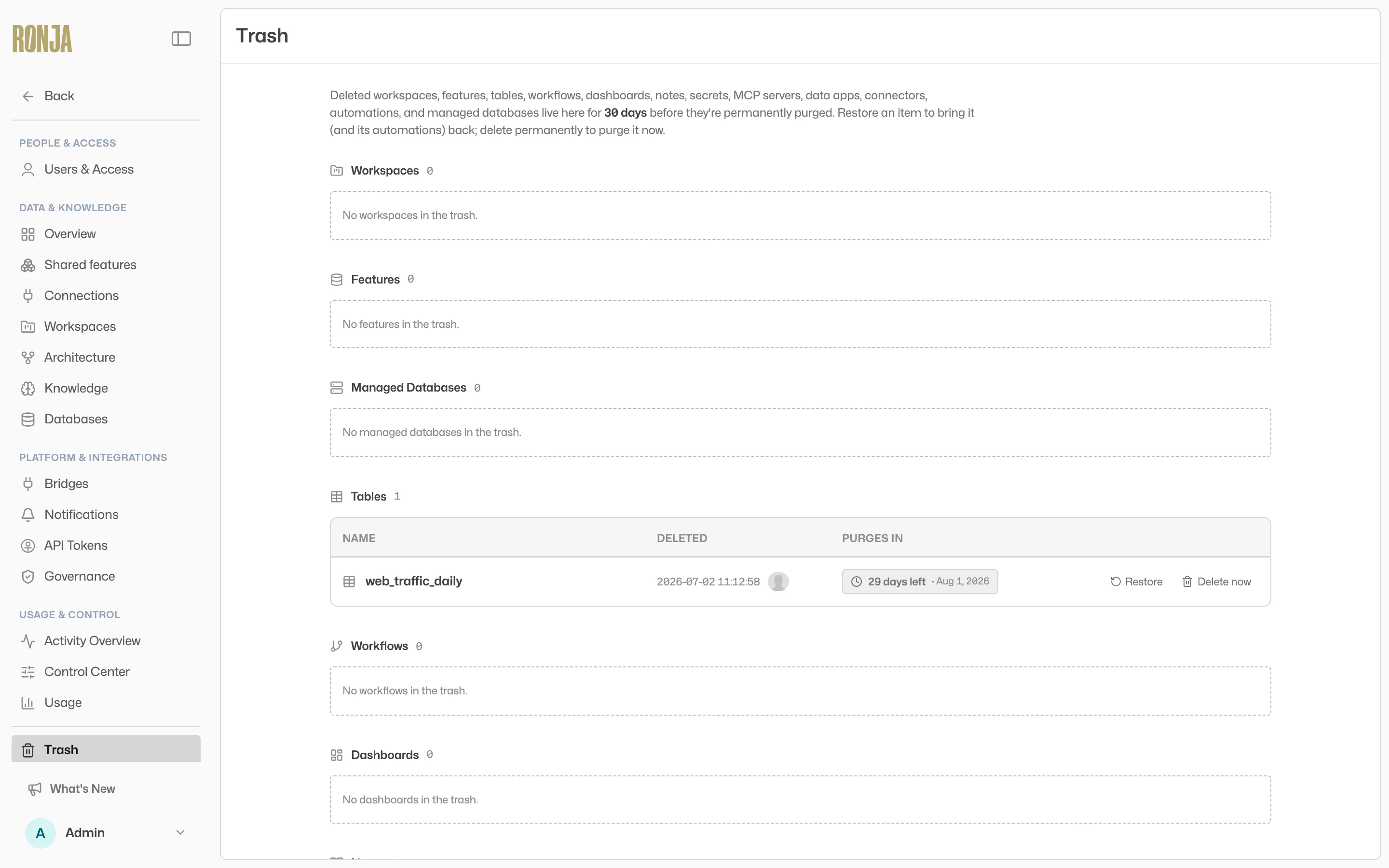 Everything deleted in the last 30 days, with a countdown to its purge.
Restore an app you never published
Section titled “Restore an app you never published”An app that has never been published is only ever visible to you, so nobody else’s trash can list it — including an admin’s. Deleting one (or discarding its draft, which is the same thing when there is no published version underneath) therefore puts it in your trash.
- Open Trash from the sidebar — the entry appears only when you have one waiting. (It is the
/data-studio/trashpage; if you are not an admin, Unpublished apps is the only section you see.) - Click Restore. The app comes back with its code, still unpublished.
Delete permanently is not offered here — purging early is an admin action. Left alone, the app is purged after 30 days like anything else.
Restore from a feature’s Trash drawer
Section titled “Restore from a feature’s Trash drawer”- Open the feature page and expand the Trash drawer at the bottom of the Inventory tab — “Restorable for 30 days before permanently purged.”
- Click Restore on the item. (For an Admin, the drawer also offers Delete now.)
The drawer lists the feature’s deleted tables, workflows, notes, secrets, MCP servers, apps and automations. Its deleted connections are listed for an Admin, and for the owner of a private feature, only.
Restore a deleted feature
Section titled “Restore a deleted feature”Deleted features have their own recovery spot:
- Open the Features page (
/my-features). - Expand Recently deleted.
- Click Restore on the feature.
Admins find deleted organization-scope features in the same accordion on the Shared features page (/features).
Delete permanently
Section titled “Delete permanently”On the organization-wide Trash page and in a feature’s Trash drawer, Delete now opens the permanent-deletion confirmation, which you confirm with Delete permanently. It skips the 30-day wait, and only an Admin is offered it.
It has to be you, in Ronja. Permanent deletion is not available through the API or the CLI — an automated caller is refused, whatever its permissions. Moving something to the trash is fully scriptable; closing the door on it is not. See Actions the API can’t take.
Good to know
Section titled “Good to know”- If a resource section cannot load, the page names it and offers Try again. Other loaded resources stay available; the page does not treat a failed request as an empty trash.
- The Trash page shows the most recent 100 items per section; older entries no longer appear on the page but are still restorable via the API until their 30 days elapse.
- Admins see every member’s deleted private work. The organization-wide Trash page lists a member’s deleted private feature and what was in it beside everything else, and an Admin can restore it or delete it permanently; the owner isn’t told. Recently deleted on your own Features page lists only your own deleted private features (and, for an Admin, the organization’s), and the owner restores theirs there. Either way it is purged after 30 days like anything else.
- An open draft of something in the trash can’t be submitted for review or committed — restore the item first, and the draft picks up where it left off. Until then a submitted draft of it is left out of the Inbox.
- While a feature is in the Trash, its tables drop out of search, table lists and the Data map, and no one — Admins included — can open them or add them to apps, workflows, automations or Saved Agents. Apps and workflows that already read them stop working until you restore the feature, which brings the tables back. The feature’s other items are unaffected.
- A table built from a table in the trash says so. A Derived table in another feature that is built from one shows a banner on its page while the input is in the trash, and its Inputs list shows the input’s name followed by in the trash. Once the input is deleted for good, the table stops updating; for a table that has held data, the people responsible are told. See Builds.
- A workflow that already uses a deleted table, secret or Agent stays editable. Saving the file that still mentions it is refused — the message names every broken reference in that file and offers both ways out, restore it or remove the reference. Any other save of that workflow goes through and tells you what is still broken, so you can clear the references one file at a time however many there are. Restoring the deleted item clears the message with nothing else to do. What stays broken meanwhile is the run: a run that reaches the deleted item still fails, and goes on failing until the item is restored or the reference is removed. Editing your way out is never blocked; the workflow is not fixed until you do.
- You don’t have to try an edit to find out something is broken. Opening a workflow or a Saved Agent that still points at a deleted item shows a Broken references panel at the top of the page, and for an app the same panel is on its Details page. It names each one, says whether it is in the trash or gone for good, and gives both ways out — restore it, or remove the reference. For a workflow it also names the file the reference is in; for an app it means removing the item from what the app is allowed to read, and for a Saved Agent, from its list of references. The panel disappears on its own once the reference is gone or the item is restored. The Workflows list flags them too: a workflow bound to a deleted table or secret carries a Broken references marker beside its name, so you can spot one without opening it — hover for the details, and open the workflow for the file each reference is in.
- An app or a Saved Agent that already uses a deleted item is never stuck either. Saving it goes through, and the response tells you what is still broken — you clear it by removing the item from what the app is allowed to read, or from the Agent’s list of references, in one save. If a save sends a Saved Agent’s deleted reference back unchanged, or you restore an older version of an app that used an item now in the trash, it is refused with a message that names the item, says it is in the trash, and offers both ways out. An app may also refuse to publish while it points at something deleted — same two ways out.
- Adding an item an app or Saved Agent does not already use gives the same “not accessible” message whether the item is in the trash or you simply can’t open it, so nobody learns about items they can’t see. If you expected to be able to use it, check the Trash.
- A managed database — and a dev copy of one — is restored from the Managed Databases section of the Trash page. It is the one kind with no Delete permanently button: dropping the real database happens on its own when the 30 days are up. Restoring a database is refused while your organization already has ten (the limit); delete one first. A dev copy restores regardless.
- Purging runs on a periodic sweep, so a just-expired row can briefly show “purging on next sweep” before it disappears.
- Hiding something from Ronja without deleting it is a different tool — archiving, which never expires. See Organize features.