
Create a saved agent
A Saved Agent is a reusable package — a prompt, a model tier, a reasoning effort, tool grants, and a pinned set of resources it may touch — that Ronja can run on demand. Like most resources, there is no create form and no sidebar entry: in the app, Saved Agents are created and edited by asking Ronja in a conversation. The Agents page is a read-only catalog.
Create one
Section titled “Create one”- Open an exploration and get the task working interactively — the prompt, the data, the output you want.
- Ask Ronja to save it. In the product’s own words: “ask the agent in a chat to save its prompt + grants as a reusable Agent”.
- Approve the action on the approval strip when Ronja pauses for confirmation.
- Find the result from the link in chat, or later on the Agents page — filter by Live / Drafts / Proposed / Archived and by model tier Fast / Standard / Mega.
Test it
Section titled “Test it”- Open the Saved Agent’s detail page.
- Type a task into the Chat with Agent panel — the box reads “Message this agent…” — and attach inputs if the Agent takes them (tables, files, notes, workflows, and more).
- Click Send, and keep the conversation going turn by turn. This panel runs the Agent as itself: its own prompt, model tier, reasoning effort, tool grants and references — so what you see here is what an automation gets. Runs started elsewhere are traced; see Monitor runs and traces.
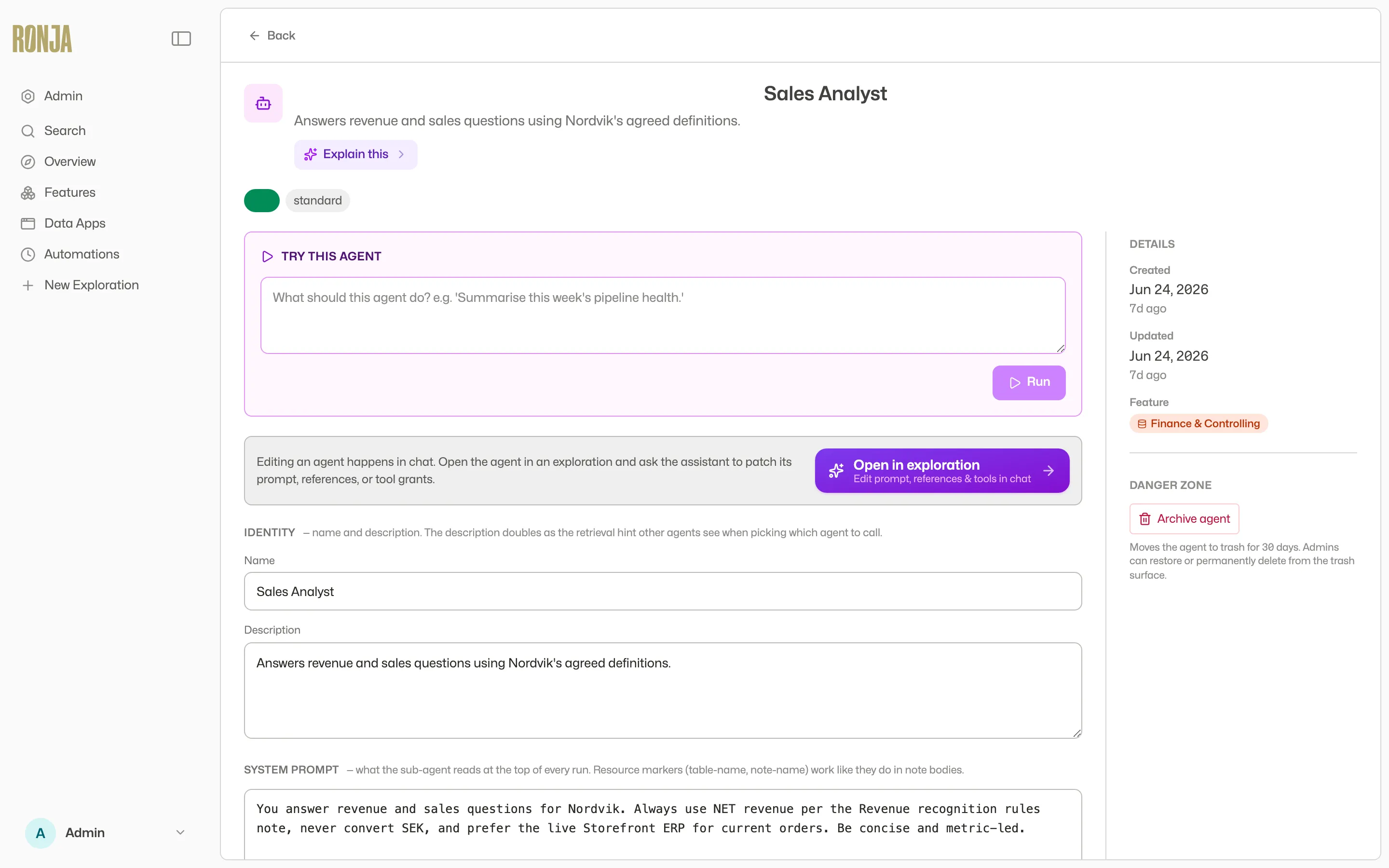 The read-only detail page: chat with the Agent here, edits happen in chat.
Edit it
Section titled “Edit it”- Click Edit in chat on the detail page — as the definition section puts it, “Read-only · edit in chat”. (This opens a Build-mode exploration, so it needs Build mode enabled for your account.)
- Ask Ronja to patch the prompt, references, or tool grants. The change goes through the same approval or proposal lane as creation.
That exploration is an ordinary conversation about the Agent, not the Agent running — it uses your own model and effort settings, the same as any other chat. To watch the Agent itself work, use the Chat with Agent panel above.
Choose how big the model is, and how hard it thinks
Section titled “Choose how big the model is, and how hard it thinks”These are two separate settings, and they answer different questions.
Model tier — Fast, Standard or Mega — is how big the model is. Fast is the default and suits coordination, triage and summarising. Standard suits multi-step analysis. Mega is for genuinely hard work.
Reasoning effort — off, medium or high — is how hard the Agent thinks before it answers. Off is the default: the Agent keeps its thinking to a minimum and works straight through, which is what you want for anything mechanical, such as routing a message, pulling fields out of a document, or running a fixed sequence of steps. Medium and high make the Agent reason more before it acts. That costs more time and more credits on every run, and it is worth it when the Agent has to weigh conflicting evidence or make a judgement call with nobody watching.
Pick them separately. A Standard Agent at high reasoning effort often does better than a Mega Agent with reasoning off, and costs less.
Both are set by asking, not by a dial. There is no control for either on the Agent’s page: say what you want in plain language when you package or edit the Agent — “make it Standard tier with high reasoning effort” — or set them from your own code, over the API or from the command line, where they are the modelTier and effort fields. The detail page shows what the Agent ended up with, read-only, under Model and Reasoning (No extra reasoning, Medium reasoning, or High reasoning).
The setting belongs to the Agent, so it applies every time the Agent runs — from an automation, from a workflow, from another conversation, and in the Chat with Agent panel on its detail page, where you work with the Agent directly. It does not apply in the Build-mode exploration that Edit in chat opens: that is a conversation about the Agent rather than the Agent running, so it uses your own model and effort settings.
Give it a fixed answer shape
Section titled “Give it a fixed answer shape”By default a Saved Agent answers in prose: a written summary plus any tables, files, or notes it nominated. That is right when a person reads the result. It is awkward when a workflow, an automation, or your own code is on the receiving end and has to pick the numbers back out of a paragraph.
So an Agent can instead declare an output contract — a description of the exact shape every run must return. Ask Ronja for it in plain language when you package or edit the Agent: “it should always return a score from 0 to 100, a risk band of low or high, and a list of reasons.” Ronja writes the contract and saves it on the Agent; you can read it back on the Agent’s detail page under Output contract, and change it the same way you change anything else — by asking.
Once an Agent has one, three things change:
- Every run returns that shape, alongside the written summary it already returned. Nothing that reads the summary today stops working.
- A run that cannot produce it is recorded as failed, with an error naming what did not fit. It never returns something that almost matches — so whatever consumes the answer never has to check.
- The result stays small. Contracts are for answers, not for data: if the Agent has a table’s worth of output, it should write the table and return its id, not the rows.
The detail page shows the contract read-only, and the run cards in chat show each run’s result under Typed result next to the summary.
A workflow can also ask for a shape at the point it calls the Agent, which takes precedence over the Agent’s own contract for that one run — useful when one workflow needs the answer in a particular form and the Agent is shared with others that do not.
Concurrency
Section titled “Concurrency”A Saved Agent carries a Concurrency setting — the same two choices a workflow has:
- Allow overlapping runs — the default. Two things can run the Agent at the same time, and both go.
- Skip if a run is in progress — the Agent runs one at a time. A start arriving while one of its runs is still going is refused: skipped, not queued. The run already going is left alone, and the late caller is turned away with that run named.
An Agent on Skip if a run is in progress shows a Runs one at a time chip on its detail page, so you can tell at a glance which of your Agents are set that way without opening each one.
An Agent that runs one at a time does so for everyone. The setting is on the Agent, not on whoever started it, so an automation, a workflow that hands it a job, an app, and a person running it from the Try this Agent panel are all just callers — whichever gets there first holds the Agent, and the rest are turned away. A refused start leaves nothing in the Agent’s own run history: nothing ran, so no run is recorded, and the caller is told which run is in the way instead. The one place a refusal is written down is an automation’s run history — a fire this Agent refuses is recorded there as a neutral Skipped run.
Chatting with a Saved Agent is outside the policy entirely. A conversation with an Agent is never refused and never holds the Agent against anything else, whatever the setting says — so an unattended run of an Agent set to run one at a time can be going while you talk to it, and neither disturbs the other.
Reach for skip when the Agent does something that would go wrong twice over — files the same records, answers the same email, moves the same balance. Leave it on Allow overlapping runs for an Agent that answers questions or summarizes, where two runs at once are simply two answers.
Changing it is an ask. The Agent’s page shows the current value under Concurrency with the line “Set by the agent that builds this — ask Ronja to change it.” — there is no control to pick it. Say what you want — “make the invoice filer run one at a time” — and Ronja changes it. On a shared Agent that change is reviewed like any other, and takes effect when an Admin approves it.
Where Saved Agents run
Section titled “Where Saved Agents run”- From any exploration — ask Ronja to run it.
- From automations — Webhook and Mailbox triggers require a Saved Agent action; Schedule, Email, Table and Event triggers can use one too.
- From a workflow — a workflow can hand a piece of its job to a Saved Agent. It can either wait for the Agent’s answer and carry on with it, or start the Agent and move on without waiting. Only a workflow that starts an Agent without waiting can run one that is set up to ask a person and wait for their reply — an Agent that stops to ask someone has to be started and left to it.
- From apps that are allowed to dispatch it — but only for Saved Agents that finish on their own. An app waits for the answer while someone watches the screen, so it cannot run a Saved Agent that is set up to ask a person and wait for their reply (see below).
When it needs a person’s answer
Section titled “When it needs a person’s answer”A Saved Agent running on its own — from an automation or an unattended run — sometimes hits a genuine judgment call it shouldn’t guess at: which of these two records is the duplicate?, is this refund legitimate? When you set it up, you can let it ask a specific person and wait for their reply. The run pauses, Ronja sends that person the question, and the run picks up exactly where it left off once they answer — or moves on if no one replies within a few days.
Ronja has three ways to ask, and picks per question:
- Slack — a direct message they reply to. Suits quick answers.
- Email from Ronja’s own address — a message they reply to from any mail client. Suits slower, considered answers, and needs nothing set up. Like the other two, this exchange can be continued past the first answer — see Carrying on the conversation.
- Email from one of your own connected mailboxes — the same question, but sent from your organization’s own address as a real email thread in that mailbox. It reaches the person from an internal address they recognize rather than from Ronja, and their reply lands back in that mailbox, so the exchange stays in the shared inbox’s history. Like the other two, this exchange can be continued past the first answer, see Carrying on the conversation. Gmail mailboxes only: Ronja can’t follow an Outlook thread back to the run waiting on it, so on an Outlook mailbox this is refused before anything is sent, and Ronja is told to ask from her own address instead. She should then say which address the question actually went out from — but the choice is hers: she may equally decide the question isn’t worth asking that way and carry on without it, saying what she was missing. That is a current limitation of Outlook mailboxes, not a temporary fault.
When the question goes by email, Ronja prefers your own mailbox if the Agent has one attached — a question from an address the person already recognizes gets answered more often than one from Ronja, and the exchange stays in that shared inbox with the rest of the conversation. Her own address is the fallback when there is nothing attached. You can tell Ronja which to prefer in the Agent’s instructions when you package or edit it. Either way the person just replies normally; there is nothing for them to log into.
Asking from your own mailbox needs an Admin to have connected that mailbox and attached it to this Saved Agent or automation as a reference — that attachment is what allows the Agent to send as your address at all. An Admin can attach it while packaging the Agent (just say which mailbox it should use) or later from the Agent’s references. Only an Admin can: if someone else asks for it, Ronja says the mailbox needs an Admin to attach it rather than attaching it quietly.
Settle this when you package the Agent, not later. An Agent can only ask from a mailbox that was attached to it, so one packaged without a mailbox will keep asking from Ronja’s address every time, even where yours would have been the better sender. So when you ask Ronja to let an Agent check with a person, she should check whether a mailbox is connected and — if you are an Admin — attach it there and then, or tell you plainly that questions will come from her own address. Adding it afterwards is an edit to the Agent’s references, which an Admin can make at any time.
Without that attachment, Ronja asks from her own address instead — and says so, rather than reporting the question as sent from yours.
Two limits are worth knowing when you decide who a Saved Agent may ask. A question sent as email goes through your organization’s Agent email policy (Governance → Organization rules) — the same setting that decides who Ronja may email at all: people in your organization always qualify, and an address outside it only if that policy allows it. On top of that, if the mailbox it asks from has a Compose recipients list set, they must also be on it, because a question is a new email Ronja chooses the recipient for — see Compose recipients. A question asked over Slack is different: it always goes to someone in your organization. Ronja also can’t ask the mailbox’s own address: a reply from there would be indistinguishable from her own outbound mail, so she asks you to name a person instead.
A question can carry files. When what the Agent needs decided is a spreadsheet, a report or an export it just produced, it can send the file along with the question instead of describing it in words — up to 10 files and 25 MB in total. The person gets an ordinary email with an ordinary attachment and replies as usual. This works when the question goes by email, whether from your own mailbox or from Ronja’s address. It does not work over Slack: a question asked there is refused if it carries files, so the Agent asks by email instead, or asks on Slack without them. Sending from an Outlook mailbox, the limit is much lower — about 3 MB per message, which is Microsoft’s limit rather than Ronja’s; if the files are too big Ronja says so before anything is sent, and names the real limit.
While it is waiting, the run shows Waiting for reply in its run history rather than a failure. Tell Ronja, when you package or edit the Agent, who it may ask (by their email) and for which kinds of decisions. Ronja asks for your approval before this ability is turned on, and it is rate-limited so it can never spam a colleague. Only the person the question was sent to can answer it.
What the person should do
Section titled “What the person should do”Just reply in the thread. No link to click, no form, no special wording — the reply itself is the answer, and Ronja picks it up and carries on.
A reply is only read as the answer if it comes from the address the question was sent to. These are not treated as an answer, and Ronja does not write back to say so:
- A reply from a different address — a personal account, or a forwarded copy answered by someone else.
- An out-of-office or other automatic reply.
- A reply with no readable text in it at all — an attachment with nothing typed above it, or a message whose formatting carried no text. Quoting is fine: a reply is still read if the person typed their answer above the quoted original, and so is one that is only the quoted original.
- Questions sent from one of your own connected mailboxes only: a reply their mail system could not verify as genuinely from them. For these, Ronja reads the checks the receiving mail server ran and accepts the reply only when those checks positively confirm the sender. A reply that fails them is refused — and so is one they could not confirm either way, which is what a mail domain with no sender-verification policy of its own produces. This is deliberately strict: the mail goes out as your organization’s own address, so an answer nobody can vouch for is not treated as an answer. A question sent from Ronja’s own address — the default, which needs nothing set up — is not subject to this: it is accepted on the reply address alone.
So if a run reports that nobody answered and the person is certain they did, that is the first thing to check. In rare cases Ronja can also send a question from a connected mailbox and then lose track of which thread it went to; when that happens the run says so plainly and continues without the answer, rather than claiming the person was never asked.
Ronja also reads only the first part of a very long reply — about 8 KB, several pages of text. If a reply is cut short she says so in the run rather than treating the fragment as the whole answer, so ask again for a shorter one if the part that mattered was further down.
Carrying on the conversation
Section titled “Carrying on the conversation”An answer isn’t always the end of it. Once someone has replied, Ronja can keep talking to them in the same thread — they see a reply to the message they already answered, not a fresh email under a new subject that reads as unrelated. There are two things she can do:
- Ask a follow-up. A second question in the same thread — “thanks, and is the same true for the Berlin account?” The run pauses again and waits for that answer exactly as it did for the first one.
- Send a message that needs no answer. A thank-you, a correction, or “never mind, I went ahead without you”. This closes the exchange: nothing is listening for whatever the person writes after it, so when Ronja still needs something back she asks a follow-up question instead of just replying.
Only one question is ever open in a single conversation at a time, so nobody is left holding two of Ronja’s questions in the same thread.
This works on all three ways to ask. From one of your own connected mailboxes and from Ronja’s own address the exchange is a real email thread, so a follow-up arrives as a reply to the message the person already answered. Over Slack it lands in the same direct message.
One thing to expect on email: mail apps take the reply address from the message you are replying to. If someone answers Ronja’s follow-up by replying to her earlier message in the thread instead of the newest one, she still picks it up as the answer to the question she is waiting on. The exception is a question that already timed out unanswered — a late reply to that one is not passed to the run at all. The person is told the question is closed, rather than having their words credited to a different question they never read.
Three things bound a conversation:
- 20 messages from Ronja — the first question, every follow-up, and every closing message, counted together (what the person sends back doesn’t count). Past that the run carries on without contacting them again.
- 30 days — a conversation stays open for 30 days after its most recent message, and each new message pushes that out again. Once it lapses Ronja can no longer write into it.
- The same limits as the first question. Every message she emails into a conversation — from your own mailbox or from her own address — draws from your organization’s daily email budget, and the per-run and per-person question limits still apply — see Limits and retention. A conversation held over Slack isn’t email and doesn’t touch that budget.
Saved Agent or a plain exploration?
Section titled “Saved Agent or a plain exploration?”Use a plain exploration for one-off, interactive work — you steer every turn. Package a Saved Agent when the same job should run repeatedly or unattended: it always runs with the same prompt and model tier, and its references pin exactly which tables, workflows, notes, secrets, apps, MCP servers, connected mailboxes, or features it may touch — nothing else. See Exploration vs Saved Agent.
You can only reference what you can already reach: an Admin can reference any live table, workflow, note, secret, app, MCP server, connected mailbox, other Saved Agent or feature in the organization; anyone else references what their access groups reach.
One Agent carries at most 100 references, counted across every kind together; asking for more is refused when the Agent is saved, naming the cap. Referencing a whole feature is the way past a long list — it hands the Agent everything currently in that feature, and anything added to it later, as a single reference.
A database login lets it write
Section titled “A database login lets it write”Referencing the secret of a write or custom database login lets the Agent change rows in that managed database — as that login, and only as far as that login allows. A custom login keeps it to the tables you named; a read login only lets it read. No login can change the database’s schema. This works the same when the Agent runs on its own and when you chat with it.
- Reference the login itself. A login the Agent only reaches through a referenced feature lets it read but not write; to let it write, add the login’s secret to the Agent’s references directly. That way putting a login into a shared feature never quietly lets every Agent that references the feature write with it.
- Removing the reference stops its writes at once, including in a run that is already going.
- Anyone who can run the Agent can make it write, from its Chat with Agent panel, an automation, an app, or another Saved Agent that runs it. That includes whoever writes the email, message or webhook a trigger feeds it, since the Agent acts on that text. The write is made as that login, whoever started the run, so reference a write login only from an Agent you would let all of them use. Prefer a
customlogin granted only the tables the Agent needs. - A
customlogin can’t write to a dev copy. Custom logins are not copied onto a dev copy, so a run against one is refused. To test on the copy, create a custom login on the dev copy and reference it from the Agent’s draft, keeping the production login on the live Agent. A login on the dev copy writes to the copy in every run, so switch the draft’s reference back to the production login before the draft is committed, or the live Agent will write to the dev copy. An Admin opening the Agent sees a Writes to a dev copy warning while it references one. Awritelogin needs none of this: it moves to the dev copy’s own write login by itself when the Agent runs against the copy, so keep the production one everywhere. - If an Agent that references a
writelogin says it has no way to write, the login is an older one. Ask Ronja for the write login again: that creates a new login and the older one stops working, so move the Agent and anything else that uses the older login to the new one.