
Ronja builds your own integration
Every company has one. The industry-specific ERP nobody else has heard of. The booking system your field team swears by. The compliance tool with three hundred users worldwide — and no connector in any data platform on Earth.
In a traditional data stack, that’s where the story ends. You file a ticket, an engineer estimates two sprints, and in the meantime someone exports CSVs by hand every Friday. In Ronja, it’s where the story starts: you ask, and Ronja builds the integration herself.
Just ask
Section titled “Just ask”Open an exploration and say what you want: “Connect our logistics platform — it’s called FreightDeck, they have a REST API.”
Ronja first checks what she already has: eight connectors that sync data on a schedule, twenty-eight services you can authorize with a single sign-in popup, and eight database engines she can query in place. If your tool is one of them, you’re done in a minute — see Connect a data source.
When there’s no match, she doesn’t say no. She researches the tool’s API — how it authenticates, what its endpoints return — and then asks you for exactly the pieces she needs to build the integration from scratch. Those pieces are three things Ronja already knows how to make: a Secret, a Workflow, and an Automation.
Step 1 — She stores the credentials as a Secret
Section titled “Step 1 — She stores the credentials as a Secret”If the tool issues API keys, Ronja opens a secure credential form just above the message box: a Credentials required card with a field for each value the API needs. The conversation pauses while it’s up. Sensitive fields are marked 🔒 sensitive and take masked input — Ronja is blocked from pre-filling them, so the key travels from your password manager to the card and nowhere else. Click Save credentials and Ronja picks up the same conversation right where she paused. (If the tool uses OAuth instead, she walks you through registering an app with the vendor and takes the client ID and secret through the same kind of form.)
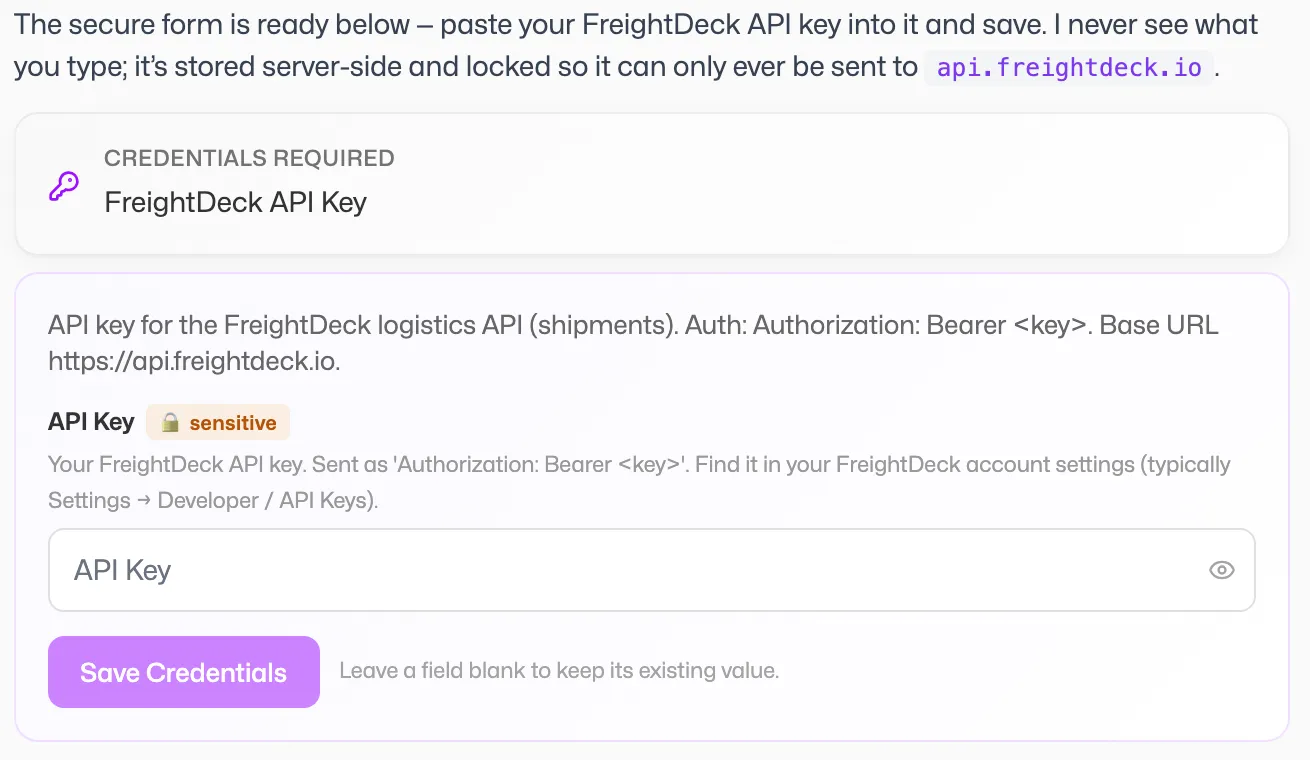 The secure card Ronja opens when she needs credentials — sensitive values are masked and never shown again.
What you’ve just created is a Secret — and it comes with guarantees worth knowing:
- Values are write-only. No screen, no API response, and no conversation can ever display a saved credential again. The product shows that a value is stored, never what it is.
- Allowed URLs bound where the credential may be used — the Secret only works against the hosts it was created for.
- Agent-visible fields limit what Ronja may even reference. She can point at the Secret; she cannot read the key.
When the vendor rotates the key next year, you update it in one place. Re-opening the credential card lets you type the new value — leave a field blank and it keeps its existing value.
Step 2 — She writes a Workflow that calls the API
Section titled “Step 2 — She writes a Workflow that calls the API”Now Ronja switches to building. In Build mode — enabled per person by your organization — she writes a Workflow: a named, parameterized Python job that calls the FreightDeck API, pages through the results, and writes them into a table.
The wiring is explicit, not implicit. When she saves the code, markers in it bind the workflow to its dependencies: the tables it reads appear under Inputs on the workflow’s page, the tables it writes under Table outputs, and the Secret shows up as an input too. The credential itself is injected server-side at run time — it never appears in the code you review or in the chat.
Then she tests it, right there in the conversation. The run card shows the result and timing; if the API call fails, she reads the run’s log, fixes the code, and runs it again. You watch the loop happen instead of waiting for a status update. When it works, she commits — Draft promoted to live — and the workflow exists as a real, versioned resource anyone with access can inspect — and re-run, subject to the same write rules as editing (running a shared workflow manually takes an Admin).
Step 3 — She schedules it as an Automation
Section titled “Step 3 — She schedules it as an Automation”One more sentence: “Run this every morning at six.”
Ronja creates an Automation — a Schedule trigger paired with your workflow as its action. She can test-fire it before it’s enabled, so the first real run isn’t an experiment. Schedules fire at most once per hour, timezone-aware, and from then on the sync happens whether or not anyone remembers it.
Living with it
Section titled “Living with it”This is where a chat-built integration quietly outclasses the script-on-someone’s-laptop it replaces:
- Run history. The Automations page shows every automation’s recent runs at a glance — a sparkline of the last runs, next-run time, and a per-run record you can open.
- Failure alerts. A failed morning sync emails someone instead of being discovered on Thursday. Automation run failed is on from the start: before anyone sets up notifications it reaches whoever created the automation, and an admin can point it at the team on the Notification routing page. See Schedule an automation.
- Execution traces. Every run leaves a full execution trace: the trigger firing, the workflow run, each step inside it, and where the time went — one timeline, end to end.
- Run now. Need fresh data before a meeting? Open the automation’s More actions menu on the Automations page and choose Run now — the sync fires on demand.
What you didn’t need
Section titled “What you didn’t need”No engineer. No integration project. No undocumented cron job that dies when its author changes teams. The credential is a governed Secret nobody can read; the logic is a versioned Workflow anyone can inspect; the schedule is an Automation with run history and alerts. Every piece has a name, an owner, and an audit trail — because Ronja didn’t bolt a script onto the platform, she built the integration out of the platform.
The next time someone says “there’s no connector for that,” take it as an invitation. Ask Ronja.