
Workflows and automations
Two building blocks turn one-off analysis into recurring, dependable work: a workflow defines what to do, and an automation defines when to do it.
Workflows: reusable jobs
Section titled “Workflows: reusable jobs”A workflow is a named, parameterized, re-runnable Python job that Ronja writes for you during an exploration in Build mode. Instead of redoing an analysis by hand every month, you ask Ronja to turn it into a workflow once — then it can be re-run on demand, filling in parameters (a date range, a region, a customer) at run time. Running a shared workflow needs an Admin; private workflows are run by their owner.
Most workflows declare a kind that describes their primary output:
- Function — computes and returns a value.
- Pipeline — reads tables and writes tables.
- Report — produces a file you can download: an HTML summary, a PDF, an Excel export, a zip of exports — any file type.
Charts and pictures a run draws are shown as well as saved, whatever kind the workflow declares — a Function that returns a number and plots the series behind it shows the plot too. They appear in the run’s card in the conversation and under the run on the workflow’s run history, whoever or whatever started the run. When Ronja lists a workflow’s runs in a conversation, the card shows at most 3 pictures — the newest — and says how many more there are; the run history shows the newest 3 under their runs the same way, with a download chip on every run’s row. Tables work the same way: a run in that card names at most 20 of the tables it wrote and then says how many more (“and 980 more”), and the run’s own page shows them all behind Show all N.
A workflow’s page shows what it reads (Inputs), the tables it writes (Table outputs) and the shared folders it files into (File outputs), what it runs (Calls), what depends on it (Used by), its files, and its run history — with the newest charts or pictures runs drew shown under their runs (three at most; every run’s row keeps its download chips), so a nightly automation nobody watched still has its picture where you look for it. Every run is recorded with a status — Running, Waiting, Continued, Success, Warnings, or Failed — plus logs and output, so “what happened last night?” always has an answer. A run paused for someone’s decision reads Awaiting approval. Edits to shared workflows go through drafts and review.
An automation’s run history is the same list with statuses of its own. Skipped is a fire that ran nothing — usually because the workflow or Saved Agent it points at was already running, or because the automation was turned off, changed or deleted while Ronja waited to retry a workflow start — a neutral record, not a failure. A fire your organization’s daily AI safety limit paused is recorded the same way, labelled Paused — daily AI safety limit, and is not run again later; one your organization’s monthly budget stopped reads Paused — monthly budget used, and is not run again later either. A workflow run someone cancelled reads Cancelled, not a failure either. An automation has no such setting of its own: whether runs may overlap is decided by the thing it runs. A Table automation that is skipped because its target was already running catches up by itself, running once more shortly after the run in its way finishes. See Concurrency.
Workflows that build on each other
Section titled “Workflows that build on each other”A step that more than one job needs — recalculating an exchange-rate table, rebuilding a customer list — doesn’t have to be copied into each of them. Ronja can give that step its own workflow, and the jobs that need it run it as part of their own work. The shared step then has one home: fix it once and every job that uses it is fixed. A workflow that runs another either waits for its result before carrying on, or hands the work off and continues — Ronja picks whichever the job needs. A workflow can’t run itself, and a chain of workflows running workflows stops at five deep. The workflow being run also has to be published: until it is, the call is refused with “not published yet” — test runs included.
That last limit comes with a convenience while you build. A workflow can name one of your own workflows that isn’t published yet, so a set of workflows that run each other can be written, reviewed and published together — you don’t have to publish the shared step first just to be allowed to point at it. Publish the one being run before you expect the chain to work.
Two panels on a workflow’s page keep that readable, so a shared job is safe to change:
- Calls — the workflows this one runs as part of its own work.
- Used by — everything that depends on this workflow: the workflows that run it, plus the automations, Saved Agents and apps built on it, and a secret that logs in with it.
Used by is also the warning you get before you break something — but only part of it stops you. Archiving a workflow, or moving it to trash, is refused while any live workflow, automation or Saved Agent declares it, or while a secret logs in with it, and the refusal names what, so the answer arrives before the damage rather than after. To clear a refusal that names a calling workflow, the change is to the calling workflow’s code: ask Ronja to take the call out, and the link disappears on its own. A secret that logs in with the workflow is listed as “logs in with this workflow”, and blocks until the secret stops using it as its login workflow. Everything else in the list is there for information: an app that runs the workflow, or a note that mentions it, is shown so you can check it, and archiving goes ahead anyway — an app whose run button points at an archived workflow simply stops working. Read the whole list before you archive, not just the refusal.
The reporting timezone
Section titled “The reporting timezone”A workflow can carry a reporting timezone — the calendar it groups by when it rolls data up per day, week, or month. An order placed at 23:30 lands on the day it belongs to locally rather than on the next day in UTC, and invoices dated the 1st fall in the month your business would put them in.
A workflow that carries one uses that calendar on every run, so a run fired by an automation at 07:00 and a run someone starts by hand in the afternoon produce the same numbers. Without it, the calendar would follow whoever triggered the run — which for a workflow that writes its results into a table means the stored table quietly changes shape depending on who ran it last.
A new workflow takes your organization’s timezone (set by an admin on the Organization rules page in the admin area) and keeps it from then on, so changing the organization default later doesn’t move the calendar of workflows you already have. A workflow created before your organization set one — or while it has none — doesn’t carry a calendar, and each run groups by whoever or whatever started it, exactly as before. To change one workflow’s calendar, ask Ronja in chat — “group this workflow’s months in Europe/Stockholm”. On a shared workflow that goes through the usual draft and review path, like any other change to its code.
Where a workflow’s report files land
Section titled “Where a workflow’s report files land”A workflow that produces report files (a PDF, an Excel export, an HTML summary — any file type) can file them into a shared folder so the right people can find them. Just tell Ronja where they should go — “save the monthly report into a Reports folder” — and she names that folder in the workflow’s code. If you don’t name a folder, the outputs still get a tidy home: each workflow gets its own subfolder — named after the workflow — under a shared Workflow outputs folder, readable by the same people who can see the workflow — so its files stay together and reachable instead of scattered.
Once the folder exists, files land there automatically — even a test run you do while still building the workflow. If the folder doesn’t exist yet, Ronja can create it for you while you’re drafting (just ask — “create that folder”), so your next test run files its report there; otherwise the folder is created when you publish the workflow. A brand-new top-level folder can only be created by an admin. Whoever creates a folder keeps write access to it, alongside the workflow that files there — so the reports your workflow produces stay reachable by the person who set it up. Publishing finalizes the workflow’s own access, and if the workflow is shared the draft review dialog shows an Access changes section naming the folders it will write to — the reviewing admin approves that access along with the code. A workflow’s page shows those folders in its File outputs section, and each folder links straight into Files.
If a run can’t reach its folder — for example the folder doesn’t exist yet, or its access was later removed — the run still succeeds and the file is saved (just not filed), and the run shows a short delivery note explaining what happened and how to fix it. You never lose an output to a folder problem.
Admins can open a folder in Files to see its Access — who can read or write it — and Written by, the workflows and automations that save files into it. Each writer may carry a small badge: no files yet means it has write access but hasn’t saved anything here so far (normal for a report that hasn’t had its first run); no write access means it saved the files that are here but no longer has write access, so its next run won’t be able to file its output — re-add its access if that’s not what you want. A writer with neither badge is healthy: it has access and its files are here. Pick the folder and audience early when you set up a recurring report, so its outputs land in the right home from the first run.
Automations: triggers that run work
Section titled “Automations: triggers that run work”An automation pairs one trigger with one action. The trigger decides when it fires:
- Schedule — on a cadence you set (at most once per hour).
- Email — when a matching email arrives at the automation’s private address.
- Webhook — when an external system posts JSON to the automation’s receiver URL.
- Table — when a watched table finishes rebuilding.
- Event — when a custom event is emitted somewhere in your organization.
- Mailbox — when new mail arrives in a connected mailbox.
The action decides what runs: a workflow (deterministic — the same job every time, on its stored parameters or on values its trigger fills in) or a Saved Agent (a reusable agent that reasons about the incoming email, payload, table build, event, or mailbox message). Webhook and mailbox triggers always run a Saved Agent — only a Saved Agent can reason about an arbitrary inbound message or payload; schedules run either, and email, table and event triggers run a workflow or a Saved Agent. A workflow on an email trigger receives the email as its inputs — see Running a workflow on each email.
Automations live on the Automations page — a list and a timeline of past and upcoming runs, with health indicators and per-automation run history. Like workflows, they’re created by asking Ronja in an exploration.
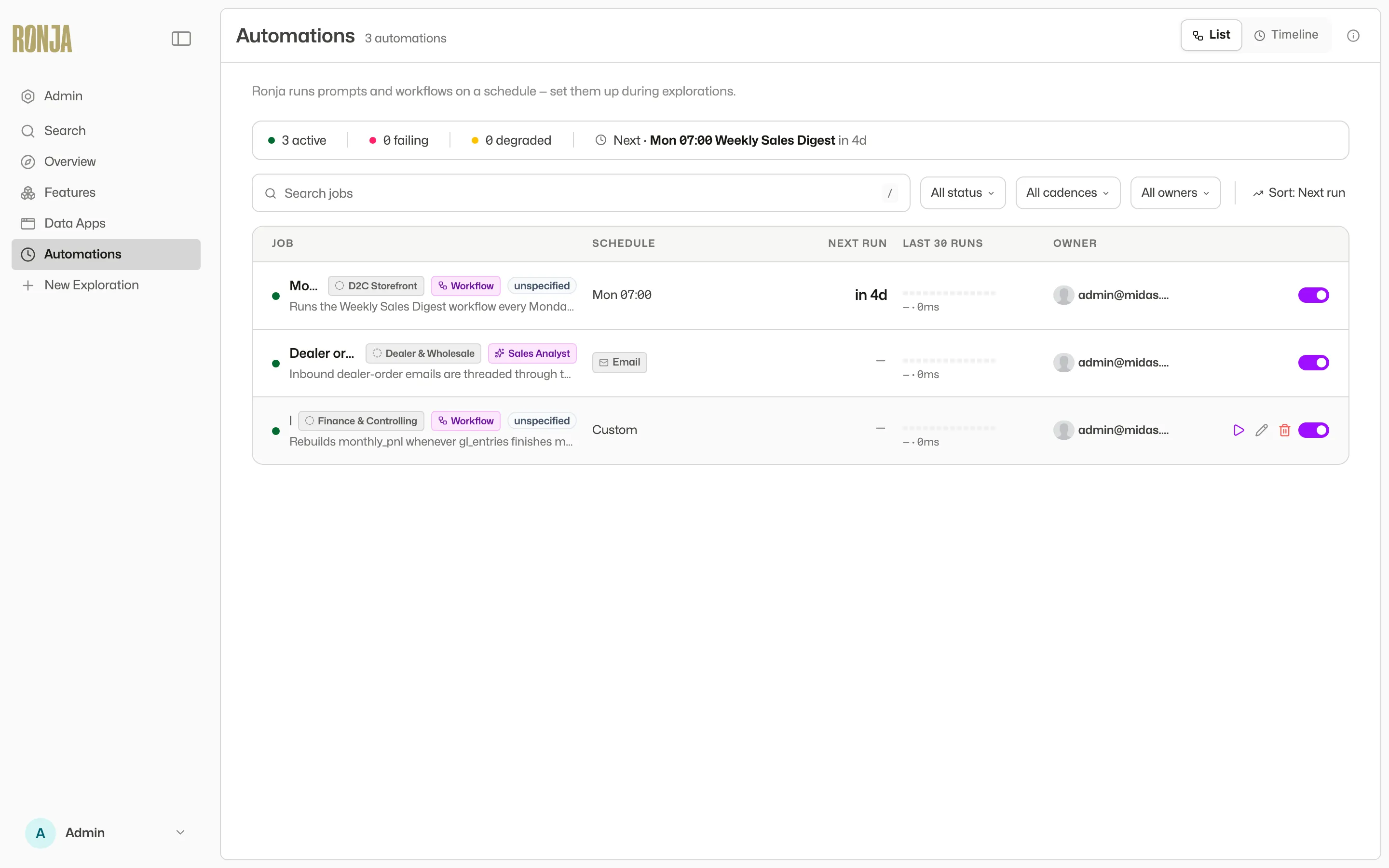 The Automations page: each row shows an automation, its tags, and when it next runs. Open its page to see the owning feature. What it runs — a workflow or a Saved Agent — is under Configuration, and in the All kinds filter above the list.
How they fit together
Section titled “How they fit together”The classic pattern: Ronja builds a workflow during an exploration (“create a workflow that calculates monthly churn”), you test-run it together and commit it — then ask her to add an automation that runs it every morning. From then on the work happens on its own. A failing automation always tells someone: the “Automation run failed” notification is on from the start — before anyone sets up notifications it emails whoever created the automation, and once an admin has set up delivery it goes to the recipients they chose. It arrives once, when an automation goes from working to failing, not once per failed run, so an hourly job that breaks overnight sends one email rather than a dozen — and never more than once a day for the same automation. Every run also produces an execution trace you can inspect step by step (traces are kept for about a year) — see Monitor runs and traces.
When a workflow run fails
Section titled “When a workflow run fails”A workflow can be run in more ways than one: on a schedule by an automation, by hand from its page, from a data app, or by Ronja during a conversation. Workflow run failed covers all of them, and it is on from the start — nobody has to switch it on first.
In Ronja. Every failed run leaves a notification under Notifications at the bottom of the sidebar, for the people who maintain the feature the workflow lives in and for whoever started the run. There is one for every failed run, not one per workflow, so a workflow that failed twenty times overnight leaves twenty — the panel is the complete record. There are three exceptions. A run an automation started that failed because the daily AI safety limit paused AI: the automation records it as Paused — daily AI safety limit instead, and no failure notification is sent. And a run someone cancelled: it reads Failed, but leaves no notification and sends no email. And a failed run of a secret’s login workflow: it leaves no notification and sends no email here, since a login that keeps failing is reported once as Secret needs attention.
By email. At most one a day for the same workflow, so a workflow that keeps breaking does not fill your inbox. Runs that a scheduled automation started send no email here at all: those are covered by Automation run failed instead, and one failure should not produce two emails. Before an admin has set up delivery on Notification routing, the email goes to the workflow’s maintainers and to whoever started the run; once delivery is set up it goes to the recipients the admin chose. An admin can change who gets it, or turn the email off, on the Workflow run failed row of Notification routing. The notifications in Ronja keep appearing either way. Its subject names your organization — [Ronja · Acme AB] Workflow run failed — and the email links straight to the failed run — Open the failed run in Ronja — and, until an admin sets up who gets it, its closing line links Notification routing; if you belong to more than one organization and are in a different one when you open a link, Ronja asks before switching.
If the run that failed was waiting for someone’s approval, the people who approved it are told separately — see Approve a workflow run.
Stopping mid-run for a person
Section titled “Stopping mid-run for a person”A Durable workflow can stop at one particular step — do the work up to it, then ask a named person to decide before going further. Approvers must be members of your organization — an Admin invites anyone who isn’t yet. The workflow’s Approval defaults approvers are checked before it can be published; approvers named at the step itself are checked when a run reaches it, and a run fails there on anyone who isn’t a member. That run sits at Awaiting approval while it waits, the approvers get an email (or a Slack message) with a link to the run, and it carries on from where it stopped as soon as someone approves — or fails if they reject it or nobody answers in time.
This works unattended: an automation can fire such a workflow perfectly well, because the approver is asked about a concrete thing, with everything up to it already done and shown to them. See Create a workflow and Monitor runs and traces.
Which one do you need?
Section titled “Which one do you need?”- Repeat the same job on demand, with parameters → a workflow.
- Run something without anyone asking — on a schedule or in response to an event → an automation that runs a workflow or a Saved Agent.
Step-by-step guides: Create a workflow and Schedule an automation. Trigger details live in Automation triggers; the one-paragraph comparison is in What’s the difference?.