
Scopes and sharing
Everything you build in Ronja lives inside a feature, and every feature carries a scope — the setting that decides who can see and use it. Sharing in Ronja means changing a feature’s scope; the resources inside follow along.
The two scopes
Section titled “The two scopes”| Scope | Who has access |
|---|---|
| Private | The feature’s creator — and your organization’s Admins, who see everything in the organization. An Admin can repair or delete something inside it, and can share it, but can’t create anything new in it — see the note below. |
| Organization | Access Groups the feature is shared to on the access map below — and, by default, everyone (see the note there). |
New features start Private, so you can experiment freely without affecting anyone. When something proves useful, you promote it to Organization, then choose which access groups reach it on the access map — with one exception, below.
Scope changes are requests, not switches
Section titled “Scope changes are requests, not switches”Widening or narrowing a scope is called a handover: you request the change, and it stays staged until an admin approves it. The current scope remains in effect the whole time — nobody gains or loses access until the approval lands. The exception is an Admin in an organization that allows self-approval: a change they make from the feature’s settings, with Share, or by asking Ronja in a chat applies at once, because they could approve it themselves. Hand over and Hand back to creator always file the staged request, even for an Admin.
There are two entry points:
- Feature settings — the Privacy section offers Request promotion (move up) and, for Admins, Request demotion (move down).
- Hand over — a guided flow from the feature page that walks through what changes for you, where the feature should go, and who must accept, with room for a note to the approver.
Both of those promotion controls are absent on My Private Feature, which can never be shared — see the caution above. Its Request demotion stays, because demoting back to Private is the repair for a home promoted before the rule existed.
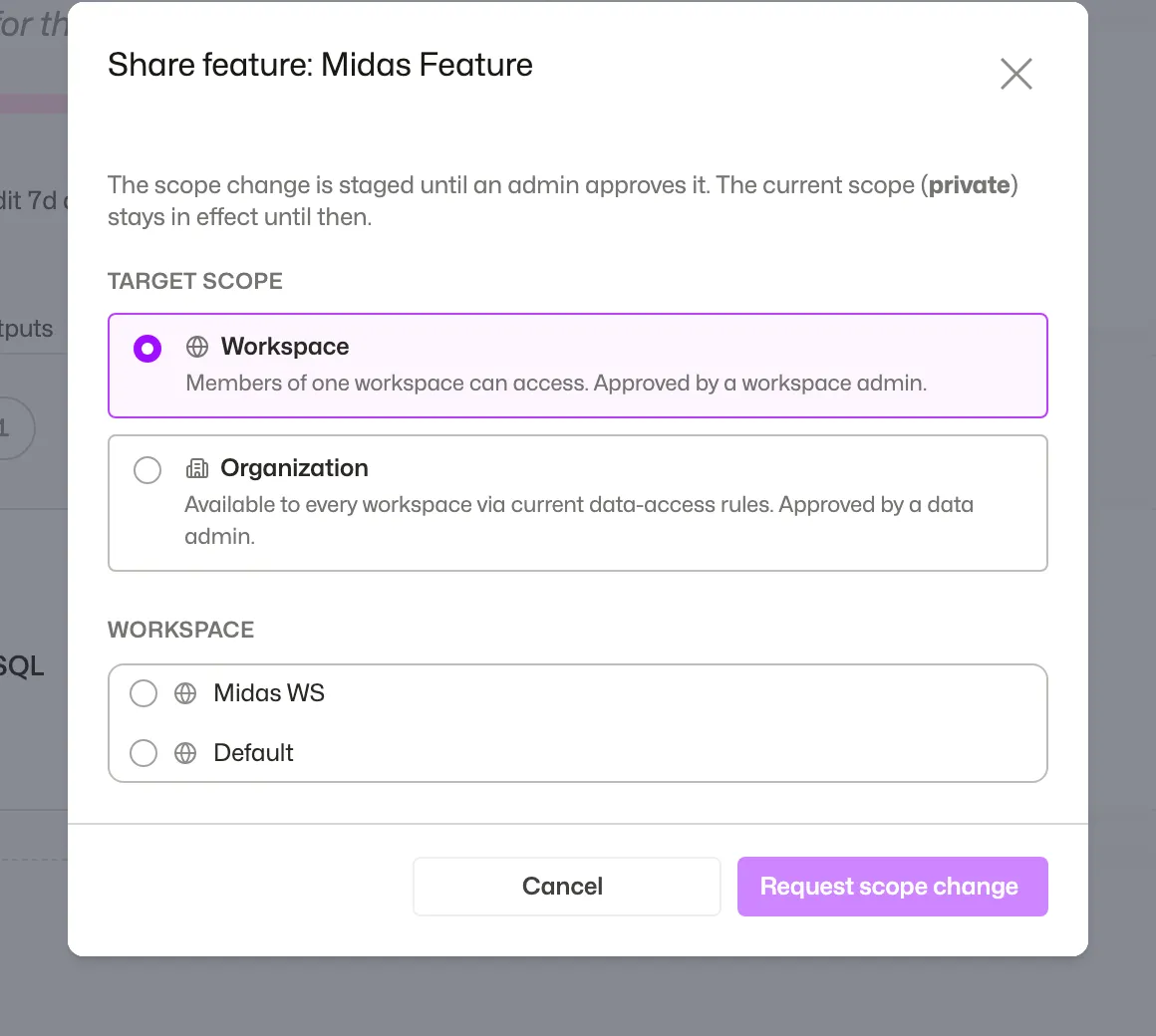 Requesting a handover: pick where the feature goes and see who must accept.
While a request is pending, the feature shows a Share pending (or Scope change pending) pill, and you can Withdraw the request any time before it’s accepted. Track your open requests under the Requests tab on your account page.
Who approves what
Section titled “Who approves what”- Promote to Organization (or demote back to Private) — an Admin approves.
An Admin reviews the request on the feature’s own page, with Review next to its Share pending (or Scope change pending) pill, or in the admin Inbox on the Shared features page. If you are yourself an eligible approver, the request form turns into a direct action — the button reads Promote to organization instead of “Request scope change”.
Maintainers of a shared feature
Section titled “Maintainers of a shared feature”Approving does not have to mean being an Admin. An Admin can make one person — or a whole access group — a maintainer of a single Organization feature.
A private feature’s owner also becomes its maintainer automatically when the feature is shared with the organization, whoever shared it, so they keep full access to it, even when no access group reaches it: such a feature can be opened by admins and its maintainers until it is added to one. The exceptions are a feature that is in the Trash when it is shared, and an owner who has left the organization. An Admin can remove this like any other maintainer.
A maintainer has full access to that one feature, without holding the Admin role. They see and open everything in it — including items an access group restricts, and even when no access group of theirs shares the feature — and they create and edit everything inside it: tables, apps, workflows, notes, secrets, automations, Saved Agents, MCP servers, codexes and modules. They can rename it and change its description, and they decide its reviews: they approve or reject colleagues’ proposals and commit or reject their drafts, so that work no longer has to wait for an Admin. A new module still starts as a proposal in a shared feature, for everyone including Admins and maintainers, and someone other than its author approves it. A maintainer finds the feature’s reviews behind the waiting for review chip at the top of the feature’s page. It reaches exactly one feature: being a maintainer of one changes nothing anywhere else in your organization, and what they see only through it they can use only inside that feature.
What a maintainer cannot do is anything about the feature itself. They cannot change who can see it, move it, delete it, restore it from the Trash, or export it, and they cannot make anyone else a maintainer — of that feature or any other. Those stay with an Admin. A few things inside the feature stay with an Admin too: permanently deleting an item before its 30 days in the Trash are up, and overriding a column’s personal-data flag.
An Admin grants it from More → Access at the top of the feature — see Grant a maintainer.
Sharing one resource without sharing everything
Section titled “Sharing one resource without sharing everything”Promoting a feature shares everything in it. To share just one thing, you have two options:
- Move it to a feature that’s already shared. Moves bundle dependencies automatically — your chosen items are “seeds”, and “linked” items ride along — and may themselves need admin approval, depending on the scopes involved.
- On an app, the Share… button offers both paths side by side — promote the whole feature or move just the app — and shows what else would be affected before you commit to anything. On an app in My Private Feature it offers the move alone, since that feature can never be promoted.
See Share and promote for the step-by-step, and Organize features for moves.
After sharing: the access map
Section titled “After sharing: the access map”On Shared features, Browse shows each feature’s purpose, maintainers and sharing summary. Access shows the matrix of features and access groups. Search, Tag and Maintained by filters carry across both views — see Grant a maintainer. In an organization with more than one Space, both views list the features of the Space you’re in, and a feature from another Space is tagged from that Space; admins can click Attach from another Space… to list the features of every Space, so a feature from elsewhere can be shared with this Space’s access groups.
A small dot beside each feature name shows its assigned color consistently in Browse, Access and the inspector; it is an identity cue, not an access status.
Select a matrix cell to inspect the grant, choose Full access, Selected resources or No access from this group, and select Save changes. Inherited full access is explained in the inspector. To change the group’s policy, use the All features switch beneath its name, then confirm the change. Turning All features off keeps the group’s access as individual grants; features shared afterwards are not added automatically. Scope decides how far a feature may reach, and group grants decide who receives access. A member’s access combines all their groups, so removing one group’s grant does not cancel access through another.
After promoting, attach the feature to an access group if no access group in your organization has All features turned on — otherwise the feature stays visible to admins only and members won’t see it. The approval screen flags this for you when it applies.
Need the exact approver for every scope change, or the per-resource scope behavior at a glance? See the scopes reference.