
Getting the most out of Ronja
Ronja gets better the more deliberately you use her. The people who get the most out of her aren’t the ones who type the fastest — they’re the ones who set her up to succeed, reuse what she’s already figured out, and spend their credits where they matter. Here are six habits that compound.
1. Let Ronja plan first
Section titled “1. Let Ronja plan first”The single biggest lever, especially in Build mode: when you ask Ronja to build something durable — a table, a workflow, an app — she doesn’t dive straight into code. She sketches an implementation Plan first in the build panel above the message box, confirms the scope with you, and only then starts building, keeping the plan up to date as she goes.
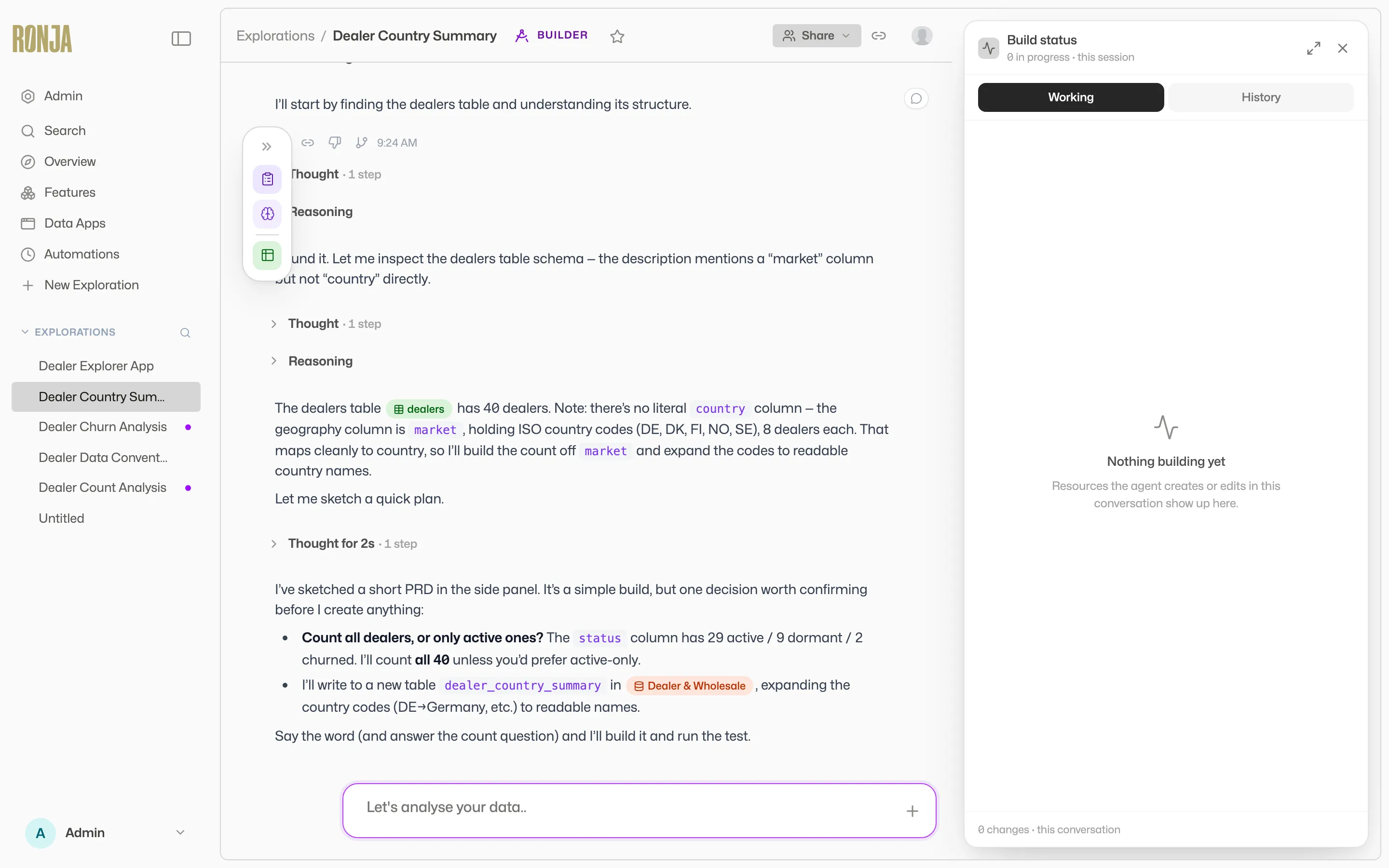 Approve the plan first — it produces a better build and wastes fewer credits.
Read the plan before you approve it. Is she building the right thing? Did she understand which tables to use and which to leave alone? A minute spent correcting the plan is worth an hour of rework — and it directly saves credits. Build mode is “the most credit-intensive work” in Ronja, so a wrong turn there costs the most. Approve a good plan and you get a better result and a cheaper one.
2. Pick the right mode
Section titled “2. Pick the right mode”The mode you choose sets how much rigor — and how much compute — Ronja brings:
- Standard for everyday questions and exploration. Most of what you do lives here. It’s fast and light.
- Deep analysis when you need to trust the answer, not just receive it — Ronja designs a methodology, checks the data can support a trustworthy answer, and shows her working. Reach for it on the analysis you’d put in front of the board.
- Build only when you’re creating something durable that will outlive the conversation. It’s the most powerful mode and the most credit-intensive — don’t use it to ask a question.
The mode is fixed once a conversation starts, so choose up front. The full picture is in Standard, Deep analysis, and Build.
3. Teach Ronja your business
Section titled “3. Teach Ronja your business”On day one Ronja knows your data but not your business — that “active revenue” excludes one-time fees, that your fiscal year starts in April, that one old table is kept only for auditors. Every correction you make can have a permanent home instead of evaporating at the end of the chat:
- Notes teach her a procedure (a skill) or record a fact about a feature’s data (a knowledge note). See Write notes.
- Policies are the standing rules Ronja is given in every conversation: Your policy for your own preferences, the Organization policy — admins only — for rules the whole company’s answers should follow. See Policies.
- The data dictionary — descriptions on your columns and tables — sharpens how she reads the data itself. See Maintain the data dictionary.
These compound. Fix a definition once and every future answer, for everyone, inherits it. The whole playbook is Teach Ronja your business.
4. Reuse over redo
Section titled “4. Reuse over redo”When Ronja gives you a good answer, don’t make the next person re-derive it. Ask her to turn it into something permanent:
- Save a one-off result as a table so it’s queryable next time.
- Package a repeated multi-step job as a workflow so anyone can run it.
- Wrap an answer people keep asking for in an app the whole team opens.
The first time costs some credits; every time after that, the answer is instant and free of the back-and-forth. This is the difference between Ronja-as-search-box and Ronja-as-teammate — see An app your team actually uses and Automate your Monday for how far this goes.
5. Watch your usage
Section titled “5. Watch your usage”If you’re an admin, the Usage page’s Cost flow shows exactly where your organization’s credits go — from the source that triggered the work down to the model behind it. Two things almost always jump out:
- Builder work dominates. Build mode is where the credits go. If usage is climbing, group the Cost explorer by User and look at the “% builder” figure to see who’s building — usually that’s healthy investment, but it’s worth knowing.
- Reuse pays off in the chart. As your team saves answers into tables and workflows (habit 4), you’ll see repeated interactive work fall.
Grouping the Cost explorer by User, Model, or Mode turns “we’re spending a lot” into “here’s exactly what on.” The deep dive is Usage & billing.
6. Review before approving
Section titled “6. Review before approving”Ronja pauses for your approval on anything consequential — creating or editing a shared resource, making a change that others will see. That pause is a feature. Read what she’s about to do before you approve it:
- In Build mode, review the Plan (habit 1) and the draft she produces before it commits.
- On the approval strip, check the specific action — not just that there is one.
- For shared resources, remember your change may travel as a draft or proposal through admin review. See Versions, drafts, and approvals.
Approving carefully isn’t slower in the long run. It’s how you keep Ronja’s output trustworthy — and how you avoid the rework (and credits) of undoing something that shipped wrong.
The habit stack
Section titled “The habit stack”None of these is heavy on its own. Together they change what Ronja is to your team: plan before building and you get better results for fewer credits; pick the right mode and you match effort to the question; teach her and every answer improves; reuse her work and the second ask is free; watch usage and you spend where it counts; review before approving and you keep it all trustworthy. Set her up well in week one, and week two starts from a smarter, cheaper baseline.