
Create a workflow
A workflow is a named, reusable job Ronja writes for you: it reads tables, computes, and produces tables, files, or reports. You never author one by hand — you describe it in a Build-mode conversation and Ronja builds it as a draft you can test before committing.
Build it
Section titled “Build it”- Click New Exploration and select Build on the start screen.
- Describe the job — the product’s own example: “Create a workflow that calculates monthly churn from our events table”.
- Watch the chat cards as Ronja works: Workflow created (a draft only you see), then File saved / File edited as it writes the code.
- Ask Ronja to test-run it — the run card shows the result, plain-language timing, and a View trace button.
- Ask Ronja to commit when you’re happy: Draft promoted to live publishes it.
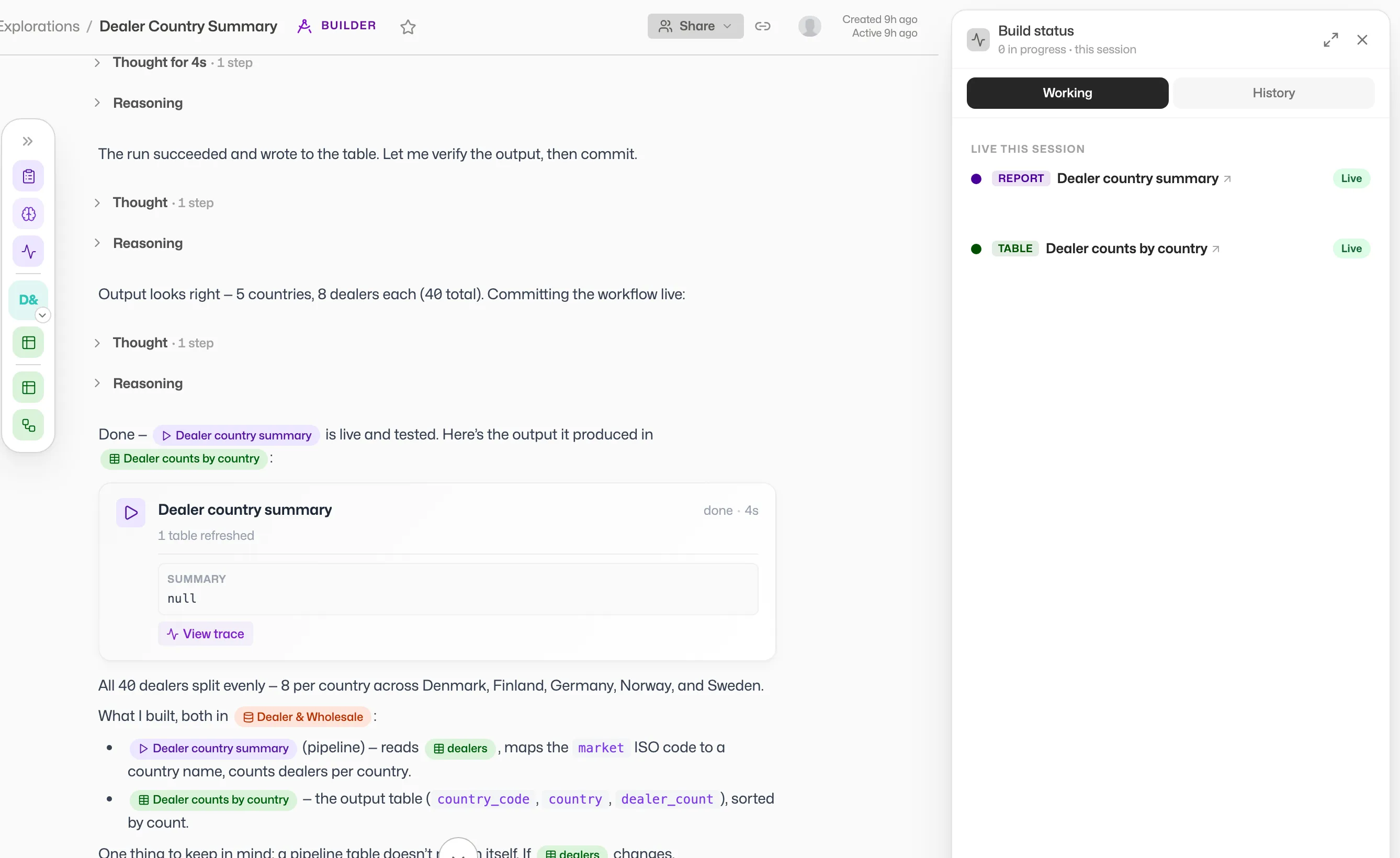 Ronja creating, coding, and test-running a workflow in one conversation.
Tables the workflow reads appear on its page under Inputs. The tables it writes to appear under Table outputs, and the shared folders it files into under File outputs. A workflow that writes more than 24 tables shows the first 24 there, with a Show all N button for the rest. Ronja binds these automatically as it writes the code.
A workflow built before Ronja changed how backslashes are read may show a Legacy SQL escapes chip: its SQL still reads backslashes the older way, and a query in it with a backslash escape the older reading decoded (such as \1, \b, \', \\ or \n) is refused with an error naming the escape and saying the Workflow must be edited and published. \d, \s and other escapes the older reading left alone run as written, and most escapes inside a comment don’t count; the error names any that does. The next change to its code moves it to the current behaviour, and the chip clears when that change is published — unless a shared module it uses still reads the older way, in which case the chip stays until that module has been updated and the workflow is published again. See how backslashes in SQL are read.
Parameters
Section titled “Parameters”Workflows can declare typed run-time parameters — text, number, date, and select. Required parameters are marked with a red *.
A select’s choices can be a fixed list, or they can load from a table. A list loaded from a table is kept until someone refreshes it: new values that reach the table don’t show up on their own. Anyone who can change the workflow can pick them up with the refresh icon (Refresh options) next to the list, beside the time it was last updated; for anyone who can only run it, the button leaves the list as it was. And unlike a fixed list, a list loaded from a table doesn’t limit what a run accepts: an automation, an app or the API can pass any value, so ask Ronja to have the workflow check the value against the table when that matters.
A parameter can also carry a default value — ask for it when you describe the job (“default the row limit to 10”). In the run form the input stays empty and shows it as a hint (Default: 10), written the way the run receives it, and a select starts on it. It is what the run actually uses when nobody fills the input in: a run started from the run form, an app, an automation or the API without a value for that parameter is given the default, exactly as if it had been passed. That is why a parameter with a default is never reported as missing, even when it is required. The one thing to know: a default the parameter cannot hold — a date written with the day or month first, such as 01/02/2026, which could mean either, or a choice that isn’t on a select’s fixed list — is not applied, and the workflow runs with no value for that parameter at all. The run form shows no hint for such a default.
A required parameter without a default needs real content: an empty value, or one that is only spaces, is refused just like a missing one. That holds wherever the value comes from, starting with the workflow’s own run form: leave a required input empty and click the run button, and no run starts — the input says Enter a value for its label, and the cursor moves to it. Type something into a date input that isn’t a date and the same happens, with Enter a date as YYYY-MM-DD. An automation can’t be saved with an empty value for it, and one whose saved value is empty — saved before the parameter was made required, say — fails on every run and sends a failure notification. An automation that fills the parameter from its trigger fails the same way when the trigger brings an empty value. An app that starts the workflow with an empty value gets an error back and no run starts. If an empty value is legitimate for a parameter, ask Ronja to make it optional and have the workflow handle the empty case itself. A select with a fixed list of choices is different: an app, an automation or the API that passes it an empty value is refused because the empty value isn’t one of the choices, whether or not the parameter is required, so ask Ronja to add an empty choice to the list instead. (In the run form, an optional select left on — select — runs with no value.)
A parameter’s description is not only the note shown under its input: Ronja reads it when she runs the workflow for you, so it is where the declaration says what a value means rather than what type it is — that a text parameter wants comma-separated addresses, or that a date is the start of an ISO week rather than of a calendar month. Ask her to add one wherever a value could be read two ways, and keep it to a short sentence.
- Open the workflow from its feature hub row or a link in chat.
- Fill in the parameter inputs below the run button.
- Click the run button — labeled Run, Run pipeline, or Generate report depending on the workflow’s kind.
- Watch the run appear at the top of the Activity list — see Monitor runs and traces.
If the most recent run failed, an Investigate with Ronja button appears under the status line at the top of the page. It opens a new chat in Build mode with the workflow’s code, its recent runs and the failing error already loaded, and Ronja already working out the cause — she proposes a fix and confirms it with you before changing anything. Admins with Build mode only; see Monitor runs and traces.
Concurrency
Section titled “Concurrency”A workflow can be started from several places — its own page, an app, an automation — and nothing stops two of them starting it at once. Its Concurrency setting decides what happens when a start arrives while an earlier run is still going:
- Allow overlapping runs — the default for every workflow. Runs may overlap.
- Skip if a run is in progress — the workflow runs one at a time. A start arriving while a run is still going is refused: skipped, not queued. The run already going carries on untouched, and it is the late caller that is turned away, told which run is in the way.
A refused start leaves nothing in the workflow’s run history. Nothing ran, so no run is recorded — the refusal goes back to whoever asked instead. You see it where you pressed the button; a script or an app calling the workflow over the API gets a 409 Conflict naming the run that is in the way. The one place a refusal is written down is an automation’s run history, where a fire this workflow refused shows as a Skipped run.
Choose skip when two copies of the same run would fight each other — both writing the same rows, or both picking up the same batch of work because neither has finished marking it done. Leave it on Allow overlapping runs for a workflow whose runs are independent, such as a report someone generates per customer.
Changing the setting
Section titled “Changing the setting”The workflow’s page shows the current value under Concurrency, and that is all it does — there is nothing to pick, just the line “Set by the agent that builds this — ask Ronja to change it.” So you change it by asking: “make the nightly sync run one at a time”, or “let this one overlap again”. Ronja changes it on the draft and it takes effect when the change is published.
Once a workflow is shared, the setting is part of what a reviewer approves, like the code. Your ask lands on a draft; Submit for review on the draft banner sends it on, an Admin publishes it, and the live workflow picks it up. (If you’re an Admin working on your own draft, the banner shows Commit and you publish directly.) See Propose and review changes.
A draft starts out set the same way the live workflow is, and the setting still belongs to one workflow at a time: a draft set to Skip if a run is in progress runs one test at a time of the draft. It never takes the live workflow’s place and never waits on it, so you can keep testing while the live workflow is running.
Approval before a run
Section titled “Approval before a run”To put a person in the loop before Ronja does something consequential, ask for a mid-run approval — the next section. The run starts, does the work up to the step you’re nervous about, and stops there to ask. It works wherever the workflow is run from: its own page, an app, or an automation on a schedule.
The approver’s side of it — the email they get, what the card asks, and what Approve and Reject do — is Approve a workflow run.
Mid-run approvals
Section titled “Mid-run approvals”Some jobs shouldn’t stop at the door — they should stop at the one risky step in the middle. A Durable workflow can do the first half of its work, pause to ask a person to decide, and carry on from exactly where it stopped once they do.
Ask for it when you describe the job: “require approval before it posts the invoices”, “ask me before it emails the customers”. Ronja writes the question the approver reads, the details they need to decide on, and who to ask.
- Ask Ronja to require approval before the step you’re nervous about — and, in the same sentence, say who should be asked (“…and ask the finance team”). Everyone you name has to be a member of your organization — an email address with no Ronja account behind it could never answer. If you name nobody, the workflow falls back on the Approvers in its Approval defaults (below); with neither, the run fails at that step rather than deciding for itself.
- Approvers in the Approval defaults are checked while Ronja builds the workflow: she tells you about anyone who isn’t a member, and the workflow can’t be published until an Admin invites them or they’re removed. A later change is refused only for someone it adds — when you publish it, or, for a workflow in a private feature (where a change applies straight away, with nothing to publish), when it’s saved. An approver who was already on the workflow and has since left doesn’t block either, though approvals asking them will fail until you replace them. A workflow waiting for review can’t have its approvers changed: an Admin invites them before approving it, or rejects it — or you withdraw it and ask again without them.
- Approvers named at the step itself are checked when a run reaches that step. Anyone who isn’t a member fails the run there, so have an Admin invite them first, or name someone who is.
- Set the deadline if the default doesn’t fit: 7 days by default, 14 days at most.
A mid-run approval needs the Durable memory to resume without redoing the work it already did — and every new workflow has it, so there is nothing to switch on (see above). An older workflow is different: adding the step changes its code, and an older workflow’s code changes only once it is brought up to date — so ask Ronja to bring it up to date in the same change.
When a run reaches that step it sits at Awaiting approval, the approvers get an email (or Slack) with a Review and decide link, and the decision is made on the run page — see A run that is awaiting approval. Approve and the run carries on; Reject and it fails; nobody decides in time and it fails too.
Those workflow-level fallbacks are shown on the workflow’s page as an Approval defaults card — the Approvers and Delivery a mid-run approval uses whenever the workflow’s own code names nobody.