
Standard, Deep analysis, and Build
Every exploration runs in one of three modes. The mode shapes Ronja’s personality, her tools, and how much rigor she applies — so choosing well at the start matters.
Choosing a mode
Section titled “Choosing a mode”On a fresh, empty exploration, the owner sees a segmented mode control with up to three segments, labeled exactly as they appear on screen: Standard, Build (shown only if you have build access), and Deep analysis.
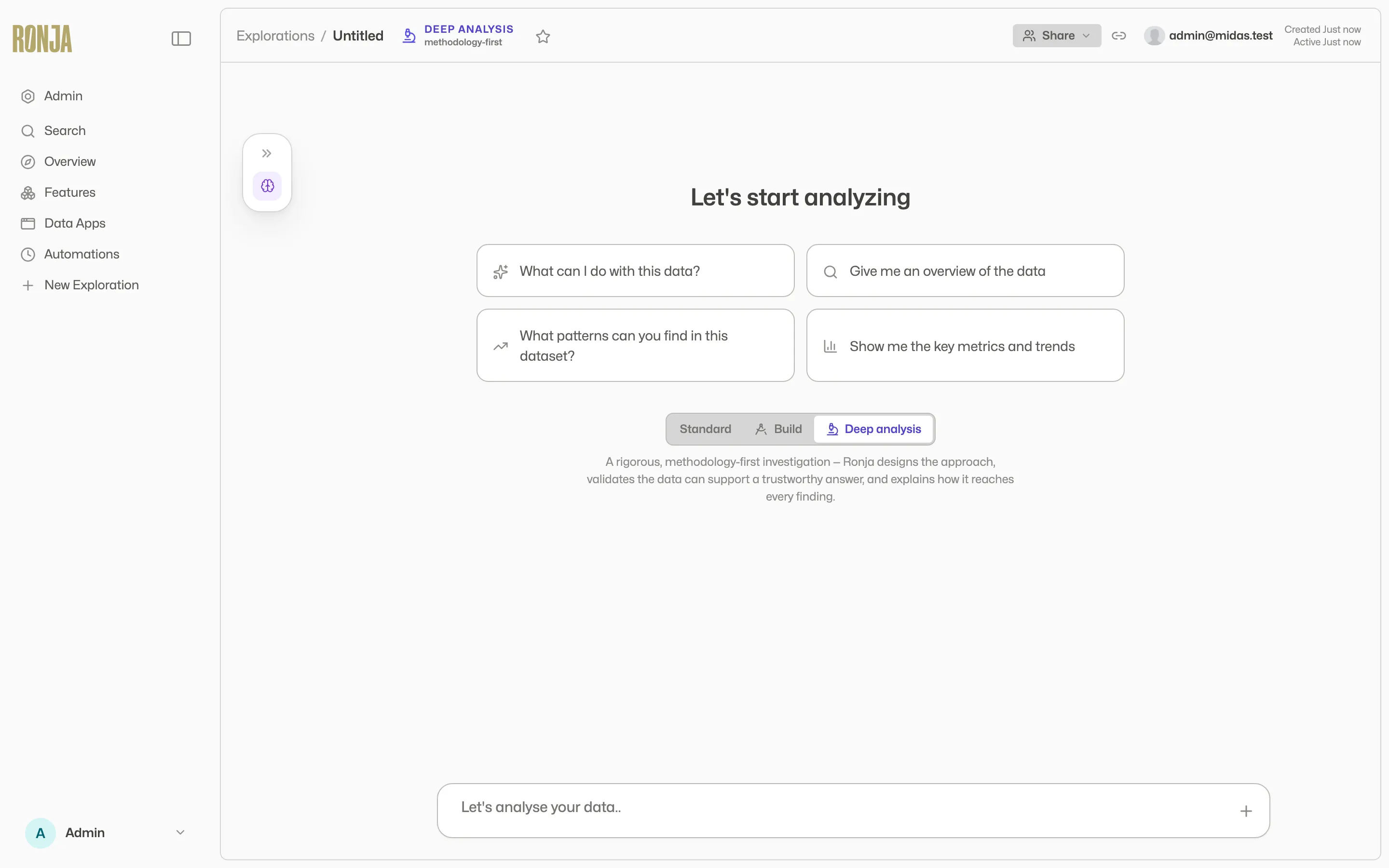 The mode picker appears only on an empty exploration, and only for its owner.
Once the first message is sent, the mode is fixed for that conversation — the product refuses later changes with “mode can only be changed before the first message” — with one exception: Ronja can request a switch to Build (below). Explorations in Deep analysis or Build mode carry a persistent header stamp (“DEEP ANALYSIS” or “BUILDER”) so you always know which lane you’re in.
Standard
Section titled “Standard”The default. Ronja answers questions, queries and charts your data, and explains what she finds — the everyday analysis conversation. No stamp, no extra ceremony. Most explorations are Standard.
A substantive answer arrives as a titled, laid-out answer — key figures, a chart beside the sentences that explain it, Caveats, Sources (see The agent). A short exchange doesn’t get that treatment: a clarifying question or a one-line confirmation comes back as plain text.
So does a turn that closes on an inline app instead — what you get when the useful answer is something to work rather than read, such as a list you filter or a threshold you slide. The finding is the text above the frame; the app is the part you poke at.
Deep analysis
Section titled “Deep analysis”For questions where you need to trust the answer, not just receive one. In the product’s own words: “A rigorous, methodology-first investigation — Ronja designs the approach, validates the data can support a trustworthy answer, and explains how it reaches every finding.”
Deep analysis uses the same analysis toolset as Standard — it does not build resources — but works with extra rigor and the deepest level of reasoning. (Standard reasons too; Deep analysis simply does more of it, and shows its work in the Methodology.) Its signature artifact is the Methodology: a living research document covering the goal, hypotheses, method, feasibility and data quality, and validation, which Ronja maintains as she works. The Methodology panel opens automatically on its first write and stays reachable from the exploration’s ledger. Ronja normally writes the Methodology and then hands the conversation back to you before she runs the analysis — read it, and reply to say go ahead or to change the approach. The conclusion arrives the same way a Standard answer does — as a titled, laid-out answer (see Talking to Ronja) — with the estimate and how sure Ronja is of it up top, the evidence beside the sentence that reads it, and the assumptions and limitations listed under it. Where the finding is something you would poke at rather than read — a sensitivity you move a slider on, a cohort you filter — the conclusion can arrive as an inline app instead, with the finding, the method behind it and its limits written above the frame. It is one or the other, never both, and it takes the place of the laid-out answer only — not of the Methodology check-in described above, which still comes first.
Deep analysis is available to everyone, but you choose it up front — on the start screen, or when picking a mode for a tangent. An existing conversation can never switch into it.
Build mode is the solutions architect. Ronja designs and creates durable resources — tables, workflows, apps, notes, and more — writing an implementation Plan first and keeping it up to date as she goes. A collapsible build panel sits just above the message box, tracking what’s in progress and what’s been built. The header stamps “BUILDER” with the subtitle “extended thinking”.
Build replies are plain text — the titled, laid-out answer of Standard and Deep analysis doesn’t appear here. A build turn ends on what was built, not on a finding, and the structure lives in the build panel and its Plan instead.
Who gets Build
Section titled “Who gets Build”Build access is granted per account. Everyone has it unless an administrator turns it off for their role or for them on the Control Center’s Rules tab. Super Admins always have it, and User Read-Only members never do. Without it, the Build segment simply doesn’t appear — and the server independently enforces the same rule, refusing with “Build mode is disabled for your account. Contact an administrator to request access.” Deep analysis doesn’t need build access. See Control Center.
Ways in
Section titled “Ways in”- The start screen — pick Build before the first message.
- Mid-conversation — Ronja herself switches when a Standard conversation turns into a build job — including when a recurring ask would be better set up as an automation. She says so in the conversation and carries straight on as the builder; there is no approval step, because the switch itself changes nothing but who is doing the work, and build access is already required for it to happen at all. It is one-way: the exploration stays in Build mode from then on.
- A tangent — when forking a tangent, you pick the branch’s mode; Build is offered if you have access.
- A button on a resource — opens a Build-mode conversation already focused on that resource: Edit with Ronja and Update with Ronja on an app, Investigate with Ronja on a failing table build, workflow or automation, and Edit in chat on a Saved Agent.
Start with the plan
Section titled “Start with the plan”The first thing Ronja does in Build mode isn’t build — it’s plan. She sketches a short implementation plan in the build panel — a collapsible card just above the message box — and uses it to confirm the scope with you before creating anything. Think of it as a mini-PRD: the shape of what she’s about to build, written down so you can react to it. The panel opens by itself the moment she writes the plan and stays up to date as the work proceeds.
Approve & build
Section titled “Approve & build”On the plan itself is an Approve & build button — right there in the build panel, under the build steps, so you don’t have to open anything to find it. Clicking it is your go-ahead: Ronja starts building straight away, and you don’t type “go” first. It also does the thing its name promises — for the rest of that conversation she creates, edits and deletes resources in the feature the plan is building in without stopping to ask you each time. Open the plan to read exactly which feature that is, and what the approval does and doesn’t cover, before you click; afterwards the panel keeps showing that the approval is live so you can Withdraw approval at any point — the next thing Ronja does then asks again.
Deleting is part of it because building is: replacing a table she got wrong, or clearing out a note that no longer fits, is ordinary work inside the feature you approved. Anything Ronja deletes this way goes to the Trash, where you can restore it for 30 days. See Restore from trash.
It never covers everything. Sending email, deleting a whole feature and clearing a table still stop and ask however you approved the plan, and approval changes nothing about review: on a shared resource your changes still travel as drafts and proposals through an administrator, exactly as they would have. See Versions, drafts, and approvals.
The approval only ever covers the feature the plan names. If the plan also points at something you can’t open, or at someone else’s private work — even as an admin who can open it — Ronja tells you so and keeps asking before she touches it.
You don’t have to grant that to start. Beside it is a quieter second button — Build, but ask me each time — which sends the same go-ahead and nothing else: Ronja starts building straight away, no approval is recorded, and she keeps stopping to check with you before each consequential step. Use it when the plan is right but you’d rather watch the work land change by change.
You never have to click either. Telling Ronja to go in your own words works exactly as well as it always did — the buttons are a shortcut for that message, not a gate in front of it. Whichever way you say go, you say it once: after a click both buttons stand down, and the panel says which kind of build is running.
If the plan doesn’t say which feature the build lands in, both buttons still start the build, and neither buys you a quieter one: with no feature named, Ronja checks with you before each change either way, and approving only records that you said go. Open the plan and it tells you so in as many words. Tell her where this should live and approve again to get the standing approval too.
If Ronja rewrites the plan while you’re reading it, approving is refused with a note that the plan changed, and nothing is built — the panel reloads so you approve the plan actually in front of you, never one you didn’t read.
Once you’ve said go — by clicking or in your own words — the panel becomes Ronja’s live progress board. A plan with more than a step or two carries a build-steps checklist, and you watch it tick off as each step lands. Collapse the card and it shrinks to a one-line status — the current step, how far along she is, and whether her checks are green — while she works; expand it again to see the full picture. Its footer keeps the session History (“History · N changes this session”) and a link to the full plan document.
Read the plan, and steer it. Going over the plan first — correcting a wrong assumption, cutting something you didn’t ask for, adding a constraint — is the single highest-leverage thing you can do in a Build session:
- Better-built resources — Ronja builds against a scope you’ve agreed on, not one she guessed.
- Fewer credits — Build mode is the most credit-intensive work in Ronja, so catching a wrong turn in the plan is far cheaper than unwinding finished resources afterward.
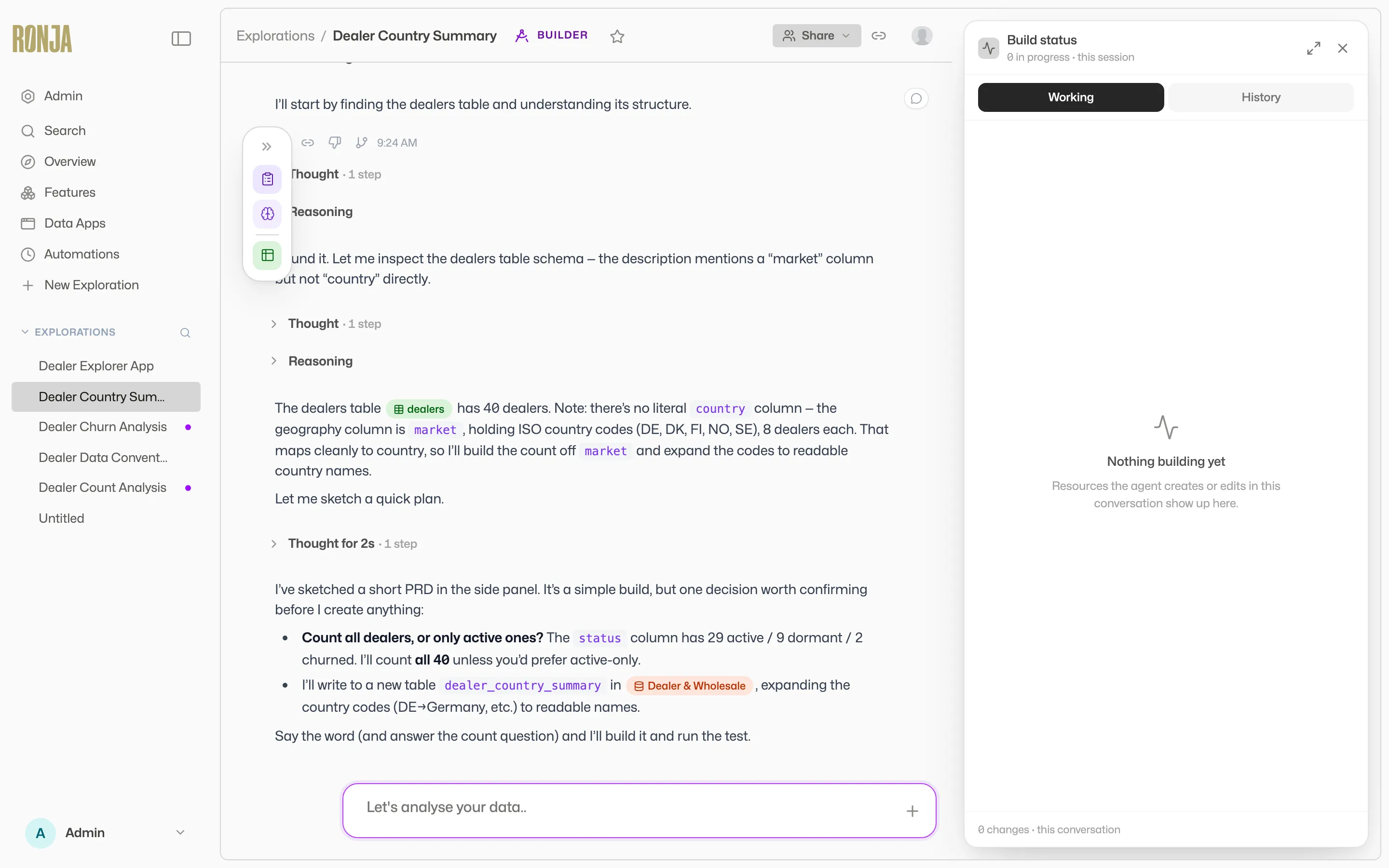 Ronja writes the plan first — read it and steer it before she starts building.
For more habits that get the most out of Ronja, see Getting the most out of Ronja.
Approval gates apply in every mode
Section titled “Approval gates apply in every mode”Build mode changes what Ronja can make — it doesn’t bypass who approves it. Consequential actions still pause on the approval strip, and edits to shared resources travel as drafts and proposals through review. See Versions, drafts, and approvals.