
Release Notes
Monthly product updates, new features, and improvements shipped in the Ronja platform.
September 2026
A data app can now carry a chat with an Agent. Automations tell you when they break, tables can check their own data, managed databases get a safe place to try changes, and a team's whole Ronja setup can live in Git. Plus a lot of small things that used to fail quietly and now do not.
- changes shipped Monday to Thursday
- 67
- more changes shipped over the weekend
- 16
Chat with an Agent inside a data app
A data app can now include a chat panel wired to one of your saved Agents. Someone using the app asks a question in context, and the Agent answers with the tools it has been approved to use, without leaving the app.
- Link an Agent, get a chat. Reference a saved Agent from the app and it gets a ready-made, multi-turn chat panel. A conversation can be forked into a full Ronja chat when someone wants to go deeper.
- Safe by construction. The Agent only uses tools that were pre-approved when it was saved. Anything that would need human approval is refused up front and explained, rather than left waiting forever.
- Published API. The same conversation is available over HTTP, so a data app is not the only thing that can talk to a saved Agent.
Automations that speak up when they fail
Failure emails are not new. What is new is that they no longer depend on anyone having set them up, and they now have a home inside the app.
- On by default, no setup needed. Every organization now gets failure notifications from the moment an automation starts failing. Existing routing still applies; without configured routing, the owner is emailed directly. Admins can switch this off for the organization.
- A notifications inbox in the app. The new bell in the sidebar collects failure notices for the owner and organization admins, whether or not email is set up. It also keeps a copy of governance emails.
- Two truthful numbers. The activity strip now shows how many automations are failing right now, and last run means the latest run of any kind, not only scheduled runs.
- Honest reporting. A run that paused to wait now reports its full duration. When Ronja itself is at fault, the run says so instead of blaming your workflow. A single query may now read from up to 50 tables.
- Read access now includes editing. Anyone who can read an automation can change what it does, and the list can be filtered by feature.
- A quicker automation list. Names are visible instead of hidden behind chips, the page no longer reloads everything every five seconds, and the health column uses one time window.
- Daylight-saving time no longer skips a run. A schedule set for a clock time that does not exist on the day the clocks change now fires at the next valid moment instead of a year later.
Tables that know what correct means
A table can now carry health checks: plain statements about its data, such as no order has a negative amount or every customer has a country. Ronja runs them every time the table rebuilds.
- Add checks to any table you can write to. Each check keeps a history of when it passed and failed.
- A failing check reaches an admin. Every table with checks shows its current health on the table page, and a failure sends a notification. A table that has not rebuilt when expected is flagged too.
A dev copy for every managed database
Changing a live database's structure used to mean changing it in production. Now there is a safe place to try things first.
- Dev copies. An admin can create a development copy of a managed database with only its structure or with its data. Workflows and Agents can point at the copy while you build.
- Promote when ready. One action applies tested changes to the production database. It refuses if the two databases have drifted apart, so nothing surprising gets through.
Your Ronja setup, kept in Git
Teams that manage their work in code can now keep workflows, data apps, pipelines and automations as files in a repository, review them like any other code, and deploy them from CI.
- Safe to keep in Git. A folder of Ronja resources can be checked in and deployed without leaking secrets or breaking on a second machine.
- One folder, many organizations. A folder declares its dependencies by name. Each organization binds those names to its own tables and secrets, so the same checked-in setup can deploy anywhere.
- See before you write. The command line shows whether a deployment would change anything and checks that everything the folder refers to still exists.
- Automations join the loop. Automations can now be managed as files alongside workflows, apps, pipelines and databases.
- Run and watch from the terminal. Start a published workflow from the command line and follow a long run through every pause until it finishes.
Workflows: faster, safer, one way to do things
Runtime 3 is now the default for every new workflow. It starts faster, holds fewer credentials, and the guides no longer teach the old shape.
- Workflows never hold a table credential. A running workflow reads Ronja tables through one governed query call, so nothing sensitive sits inside the container.
- Long-running workflows start faster and cost less. Connections are pooled, credentials are cached, and each step is a single call.
- Save any kind of file. A workflow can now produce PDFs, images, spreadsheets or any other file, not only CSV.
- The same approval flow as everything else. Workflow drafts, proposals and approvals now use the shared governance process with a full audit trail.
- Runtime 3 by default. Every new workflow uses the current runtime without an extra choice or migration step.
- Reference work still in draft. A workflow can reference another workflow before that second workflow has been published.
A chat that never leaves you hanging
A model-provider hiccup or a brief database blip could leave a conversation frozen mid-sentence. Those paths are now closed.
- Every turn ends. A stalled reply is rewritten rather than abandoned, a turn always reaches done or failed, and when Ronja retries, it says so.
- Long chats compact cleanly. The earlier-conversation summary now lands in the right place.
- Deep Analysis checks in first. It now confirms its approach with you before running instead of going straight to results.
- Very long answers no longer fail. Ronja now handles answers that reach the model's output limit.
More capable documents and apps
- Notes can be full HTML pages. A note body may now be HTML, shown in a sandboxed frame and styled with Ronja's document theme.
- Apps can open files. A data app can provide a link that opens a Ronja file in a new tab.
- Apps show workflow progress. An app that starts a workflow now shows its steps as they run instead of displaying a blank wait.
- The builder uses the component kit. When Ronja builds an app, it now reaches for ready-made components instead of hand-rolling its own.
- Chat inside apps works reliably again. Queries also say when they are finished instead of spinning forever.
- Compiles means renders. An app that references something undefined can no longer pass the compile check and then fail on screen.
Fixes worth knowing about
- Form-shaped PDFs keep their reading order. Invoices, specification sheets and similar documents now keep labels and values together instead of reporting printed fields as blank.
- Rate limits explain themselves. The browser and data apps now see a clear prompt to try again instead of an opaque network error.
- Empty BigQuery results are valid. A query with no matching rows returns an empty result instead of an error.
- Empty rows stay visible. A row whose only column is empty no longer disappears from external queries, data apps or the SQL API.
- Safer SQL errors. Errors start with a readable sentence, and a failed connection never exposes the connection string.
- External database queries reuse connections. They also honor read-only mode.
- Chart downloads work across browsers. Downloading a chart image no longer produces a blank file in some browsers.
- Re-authentication state clears correctly. Saving a credential now removes the re-authentication-required state.
- New tables can be push targets. A table can be selected before it has received its first write.
- Explain this opens in the right layer. The explanation now opens above an app's tab bar instead of underneath it.
- Truncated app reads are marked. A data app now tells you when it is showing an incomplete read.
Engineering
Behind the scenes
Nothing visible, but each change makes the next week's work faster or safer.
- One rule for private-feature access. The rule now exists in one place, with a test that fails if it is duplicated.
- Faster automated code review. The review time dropped from about 25 minutes to about 15.
- More honest fleet-board guidance. The board tells you what to do about each row and states when it is showing last night's data.
- Complete guide rules. Two guides that lacked the marker rule and background-sweep catalog now include them.
- Finished work stops getting lost. Completed branches are pushed and landed worktrees are cleaned up automatically, with the same control available from the browser.
- Stricter review outcomes. Review suggestions are no longer optional reading, and a lane that times out no longer blocks a merge.
- More production memory. The ceiling is now 4 GB per app instance.
- Cleaner built-in skill metadata. Built-in skills no longer show model ID shapes they never actually hold.
Also landed over the weekend
Sixteen changes merged just before the week began. These are the four the team will notice.
- A long conversation is summarized and continued, not ended. Budgets are sized by model, very large tool results are trimmed, and a chat that still outgrows the model is summarized and carries on.
- Workflows and Agents can refuse to overlap. An optional skip-if-already-running policy records a second start as skipped, not failed, and sends no alarm. It is off by default.
- A saved Agent chooses how hard it thinks. Each Agent now declares a reasoning effort alongside its model.
- Data apps learn the organization's currency. The organization now declares its reporting currency and number format, and every generated app receives that context.
The rest includes Intel and ARM server images, cheaper ARM scheduling, a release build that no longer runs twice, improvements filed as issues, and several fleet-board and review-pipeline fixes.
More of the work. Still owned by you.
This summer Ronja grew from a place you open into a platform that does more of the work between the systems you already use, and does it where your team already works. It reaches into Slack, Teams, and email, builds working systems that run on their own, and always stops for a person before anything important happens.
A capable platform is still just another tab if someone has to open it, paste the context in, and copy the answer back out. This release closes that gap. The work now starts, moves, and finishes where your team already is, and every part of it stays owned by you.
August 2026 · Broader reach, tighter control
The work keeps moving.
Humans stay in charge.
Ronja now works in Slack, Teams, and your company inbox, builds real systems with a database of its own, and pauses for a person whenever a decision matters. A single task can travel across people and teams without anyone opening Ronja itself.
Ronja stops and asks a person before it acts
When a decision should belong to a person, Ronja pauses, asks, and waits. Guessing is not autonomy.
When an automated run hits a judgment call, it used to have two poor options: guess, or stop. Now Ronja pauses, asks a real person in Slack, Teams, or email, waits for the reply, and picks up exactly where it left off. The same gate stands in front of anything sensitive, so nothing is sent, changed, or paid for until a named person approves it.
And the exchange can be more than one question. Ronja can hold a back-and-forth, ask a follow-up, attach the exact table or result behind the doubt, and bring in a different colleague when the decision crosses a team.
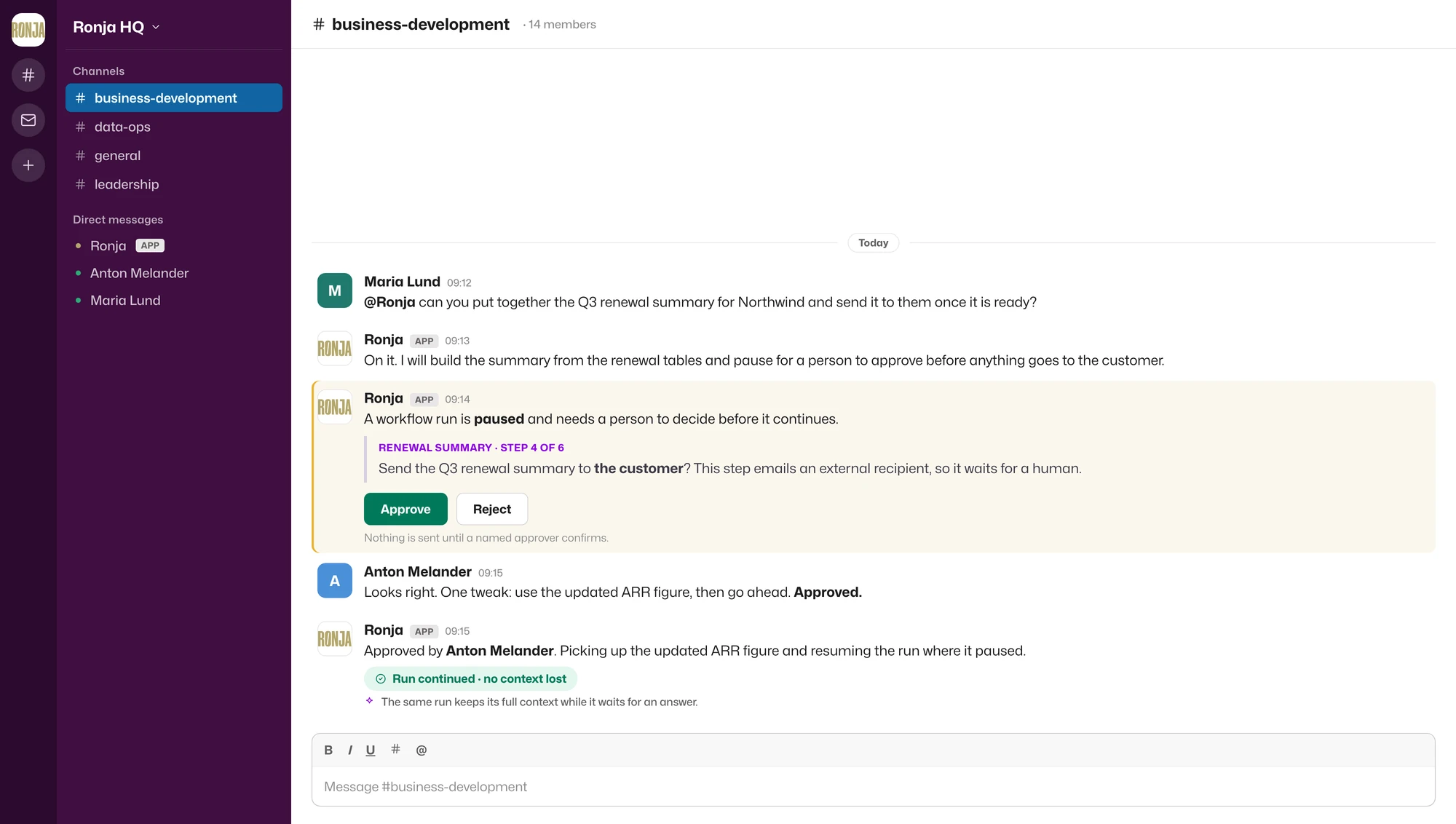
Why it matters: Work no longer stops because the person with the answer is not inside Ronja. Ronja goes to them, brings the answer back, and leaves the decision in human hands.
Ronja gets a real company email address
Your own Gmail or Outlook address, not a robot address bolted on beside it.
Connect a company mailbox and Ronja can read incoming mail, reply in the same thread, write a new message, and sort what arrives. An incoming email can even kick off a workflow, so the inbox becomes a place where work gets done instead of another pile someone has to copy from.
The guardrails come with it. Admins set how many emails can go out per day, limit who Ronja is allowed to write to, and block spoofed senders. Ronja works as your address without ever quietly deciding who your company should contact.
From a Slack chat to a reusable tool
Ask in the channel, watch it work, and keep the part that turned out useful.
The Slack integration grew up over the summer. Ronja remembers the channel it is working in, accepts file attachments, and posts its progress live as it goes. When a one-off request turns out to be worth keeping, a single click on Build this in Ronja turns the conversation into a saved app or workflow, with nothing to rebuild. Microsoft Teams, which arrived back in June, works the same way for Microsoft 365.
Why it matters: The chat window stops being a dead end. A request can begin as a quick message and end as a tool the whole team reuses.
Ronja builds the whole system, database and all
Not just an answer to a question, but a working system that stores its own data, runs again, and stays current.
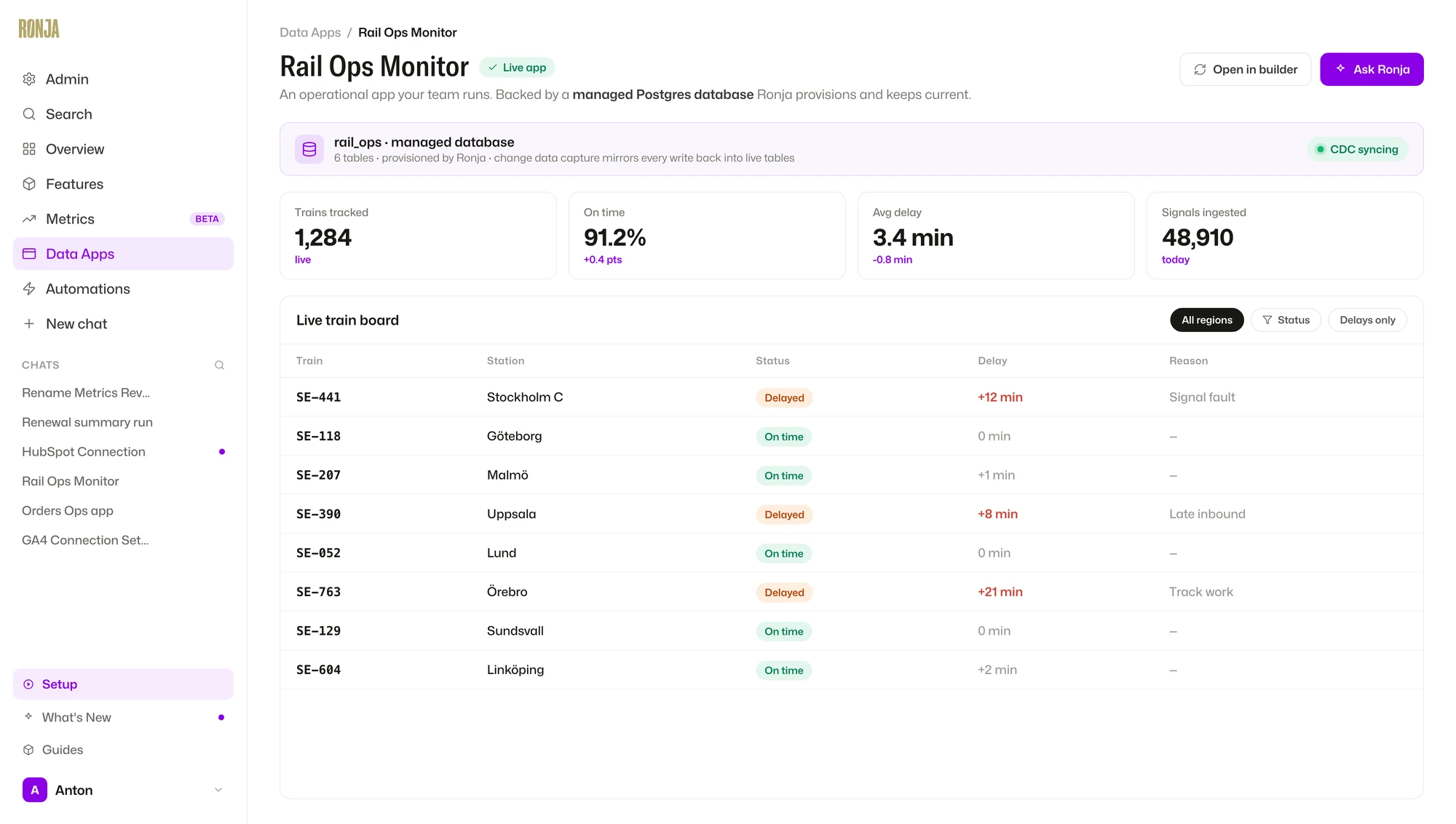
June gave Ronja real apps. This release gives them a real database underneath. Every workspace can now have its own managed Postgres database that Ronja sets up, updates, and reads and writes as the work happens. Every change flows straight back into your live Ronja tables, so analysis and apps stay current with no manual export in the middle.
Put that together with the redesigned apps, saved agents, workflows, and six different ways for work to start, and the whole picture changes. You can now ask Ronja to build an internal system from end to end: the database that holds the data, the app people use, the logic that runs, and the automation that keeps it moving, all without leaving Ronja.
Use Ronja from your own code and the command line
A command-line tool, a public API, and documentation written for people and AI agents alike.
Ronja is no longer something you can only use by clicking around inside it. There is now a proper command-line tool that brings Ronja into your terminal, and a public API your developers can call from their own software, with keys that grant only what each integration needs.
Choose your AI model, open-source or ChatGPT
Different work wants different models. Now you pick, and you can switch whenever you like.
Ronja is no longer tied to a single AI model. Run it on leading open-source models, on ChatGPT, or on an EU-hosted model when your data needs to stay in Europe. Pick whatever fits the task, the budget, and the rules you work under.
Sensitive data gets found and hidden automatically
Ronja spots personal data in your tables and can mask it before anyone sees it.
When data connects, Ronja now scans it for personal information: names, email addresses, phone numbers, and the like. Once a column is flagged as sensitive, it can be masked so the real value never shows up in an answer, a chart, or an export. Sensitive fields get caught early instead of slipping through by accident.
Give Ronja a knowledge base to read from
The company knowledge that lives in documents, not tables, now sits inside Ronja.
The systems you build can now hold large amounts of text. Upload PDFs, Word files, slide decks, or images, and Ronja searches them and pulls the passages that matter into its answers and actions, so the right paragraph turns up exactly when it is needed. Knowledge stops being an attachment someone has to remember to bring along.
Why it matters: Your policies, contracts, and playbooks become something Ronja can actually use, not files that sit unread in a folder.
See what Ronja did, and fix it when it breaks
Every result can show its work, and every failure can be traced in a single click.
June let you ask “what is this?” about any report. This release goes further into what actually ran. When an automation fails, Investigate with Ronja turns the failed run into a one-click diagnosis of what went wrong and where. And a step-by-step trace follows a single run even as it moves through an agent, a workflow, a table, and an action out in the real world. Sophisticated does not have to mean impossible to follow.
Smaller controls that grow with you
The quieter changes that keep a larger deployment under control.
From a tool you open to a platform that carries the work
Answering a hard question was always the starting point. Now the work continues after the answer: Ronja asks the person who needs to decide, waits without losing the thread, acts when they approve, and keeps the system current for the next time.
The biggest change is not that the platform does more on its own. It is that it does more of the work, across more of your systems and channels, without ever taking the decision away from a person or the ownership away from you.
The work goes where your team already works, and a person still makes the call.
One number. One definition.
Every company has one: the number two people report differently, and nobody is quite sure which one is right. This release is my answer to that.
Most “whose number is right?” arguments are not data problems. They are definition problems. The rule for how a number is calculated lives in someone’s head, in a buried filter, or in a formula three people have quietly edited in different directions. A Metric pins that definition down in one place, so the number stops drifting and starts being trusted.
July 2026 · Introducing Metrics
One number.
One definition.
A semantic layer over your data: the KPIs you ask for again and again, defined once and traceable to the source. Verified by your team, drift-checked by me, and the same whether the CEO, the CFO, or the newest hire asks.
From exploring your data to simply querying it
Most of your questions deserve a conversation. Your KPIs deserve a lookup.
Here is the shift underneath all of this. Most of the time when you ask me something, we explore together. I read through your tables and we reason about the data and the logic to apply, question by question, until the real insight surfaces. That back and forth is the whole point for research and open questions, where you are uncovering something you have not looked at before. Nothing here replaces it.
But the numbers that actually run your business, active users, ARR, churn, you ask for again and again. Working the logic out afresh every time is slower, and every fresh derivation is a chance to drift. A Metric flips that. Once we have reasoned out the right definition, it is written down and locked, so my job shrinks to finding the metric that matches your question and running its saved code. Same code, every time. That is what makes the answer both faster and always accurate.
Why it matters: Think of it as the difference between asking me to work out an answer and asking me to look one up. Exploration is how we uncover what a number should be. A metric is how we lock it in once we know.
A metric is a definition, not a dashboard Beta
The authoritative definition of a business number, traceable all the way back to the data it is computed from.
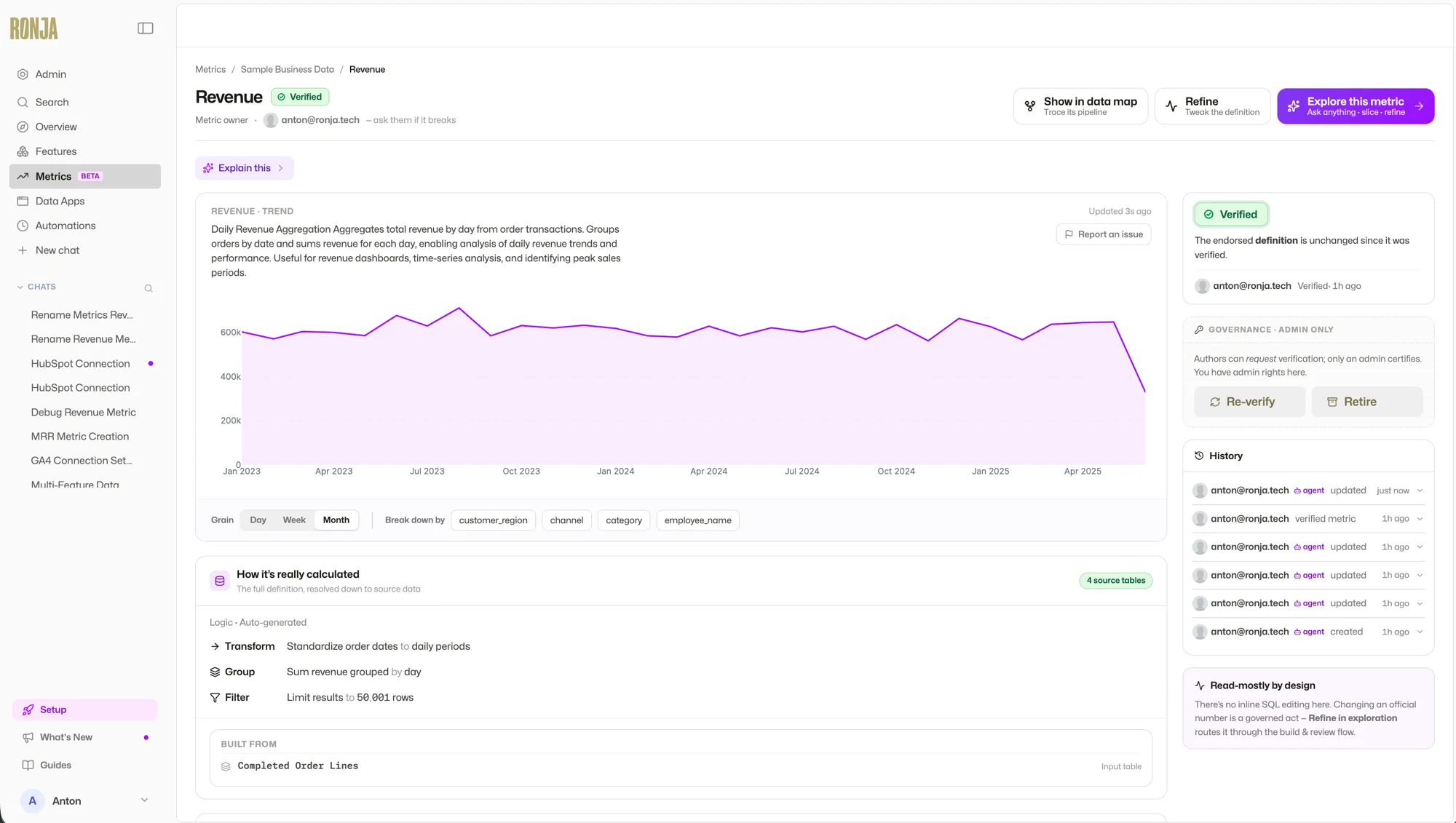
A Metric is a codified KPI. It is not a chart and not a table. It is the rule that says “this is what revenue means here, and this is exactly how it is calculated.” Ask me for it and I run its saved definition against the current data, so you always get the live number, not a stale snapshot.
Why it matters: This is the difference between a number people debate and a number people decide on. Define it once, and every chart, report, and automation that uses it agrees by construction.
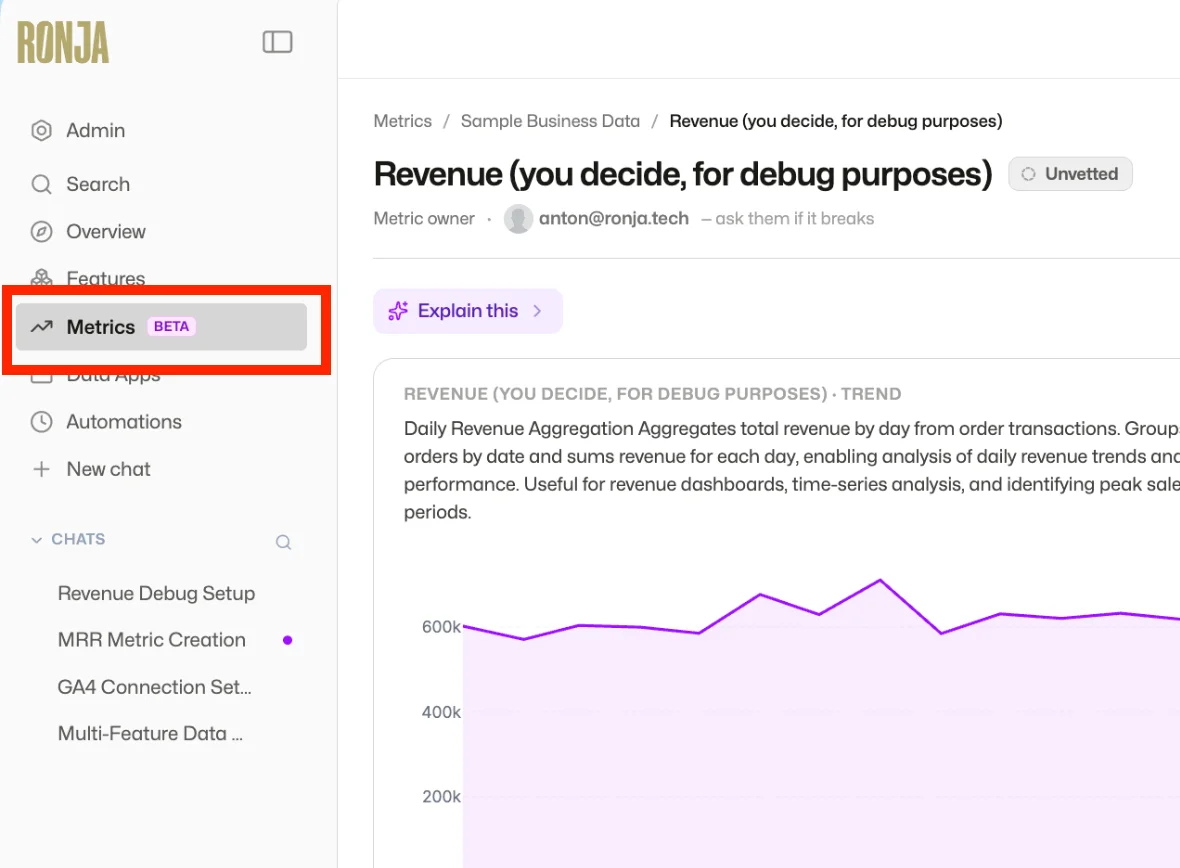
Open the Metrics tab
Your home for every KPI your team has defined, and the first place to look when you want a number you can trust.
Click Metrics in the sidebar. Every metric shows who owns it, its current trend, and where it stands in the lifecycle, so you can tell at a glance whether it is ready to stake a decision on.
Describe the number. I build the definition.
No SQL required. Tell me what the number means to you, in plain language.
Click New metric and describe it the way you would to a colleague: “monthly recurring revenue, net of refunds” or “active customers this week.” I build the definition from your source data together with you in an exploration, show you the recipe, and leave it ready for your team to verify.
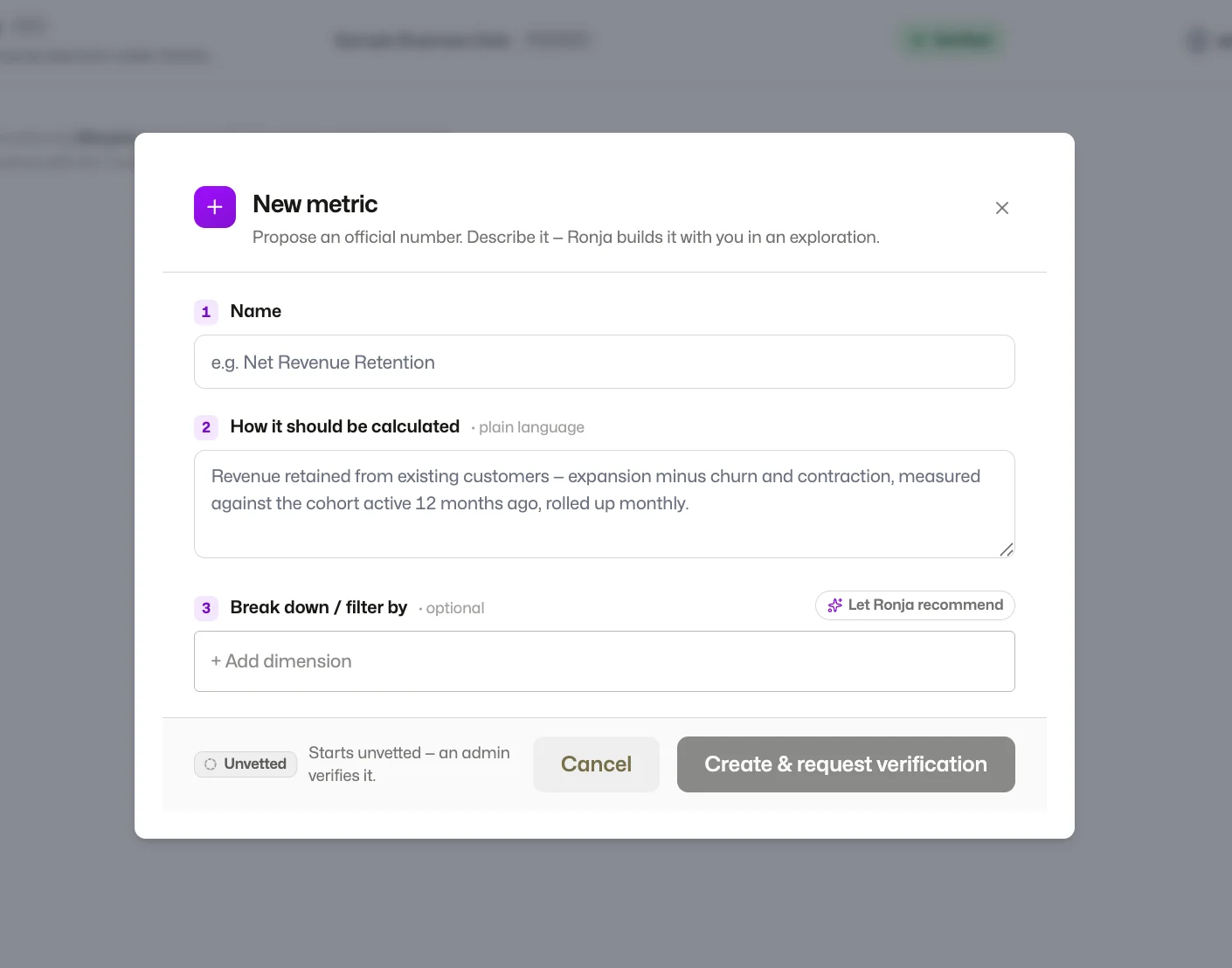
The badge tells you where a number stands
Trust is earned, not assumed. Every metric carries a status, so you always know whether to rely on it.
Unvetted
The metric computes correctly, but no one has endorsed the definition yet. Fine to use, worth a look before it goes in a board deck.
Verified
A team member has reviewed the definition and confirmed it. The trust badge is live. This is the number to rely on.
Retired
No longer the active definition, but still there for historical reference. The business moved on, and the badge says so.
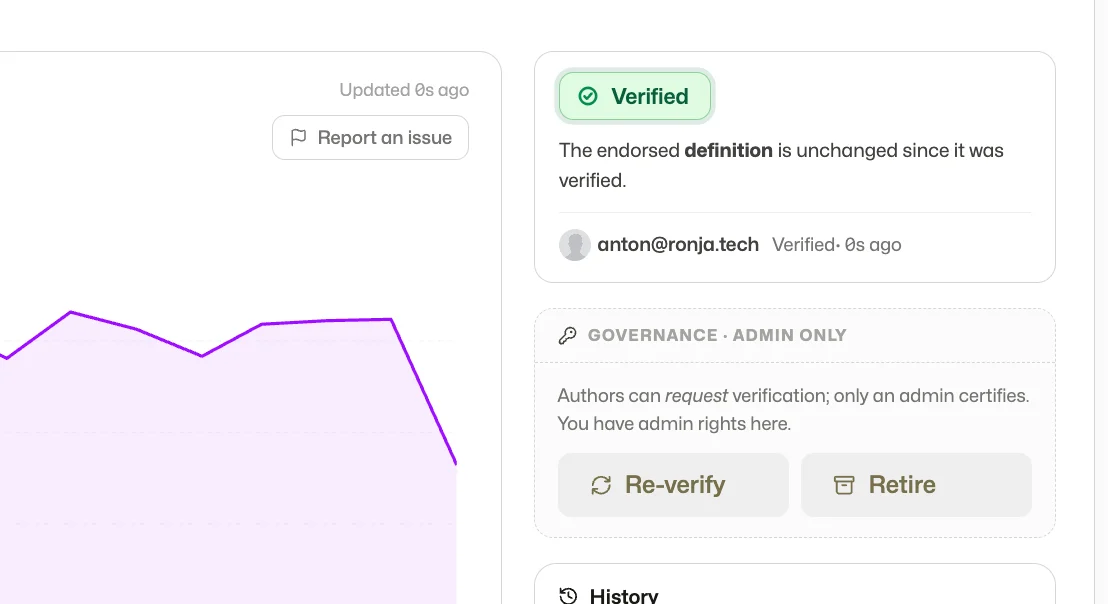
Verification is governance enforced in software, not a convention. Anyone can propose a metric and request verification, but only an admin certifies it, and the badge shows who verified it and when. If the endorsed definition changes afterwards, the badge does not quietly survive. I flag the metric for re-verification.
Every metric keeps its path back to the source
Where does this number come from? The answer is on the screen, not in someone’s head.
Metrics live in the same data map as everything else I build. Filter the map to metrics only and you see your business layer: each KPI with its upstream path back through every derived table to the raw sources. Open one and I show you how it is calculated in plain steps, alongside the full lineage, from the source tables all the way down to the number itself.
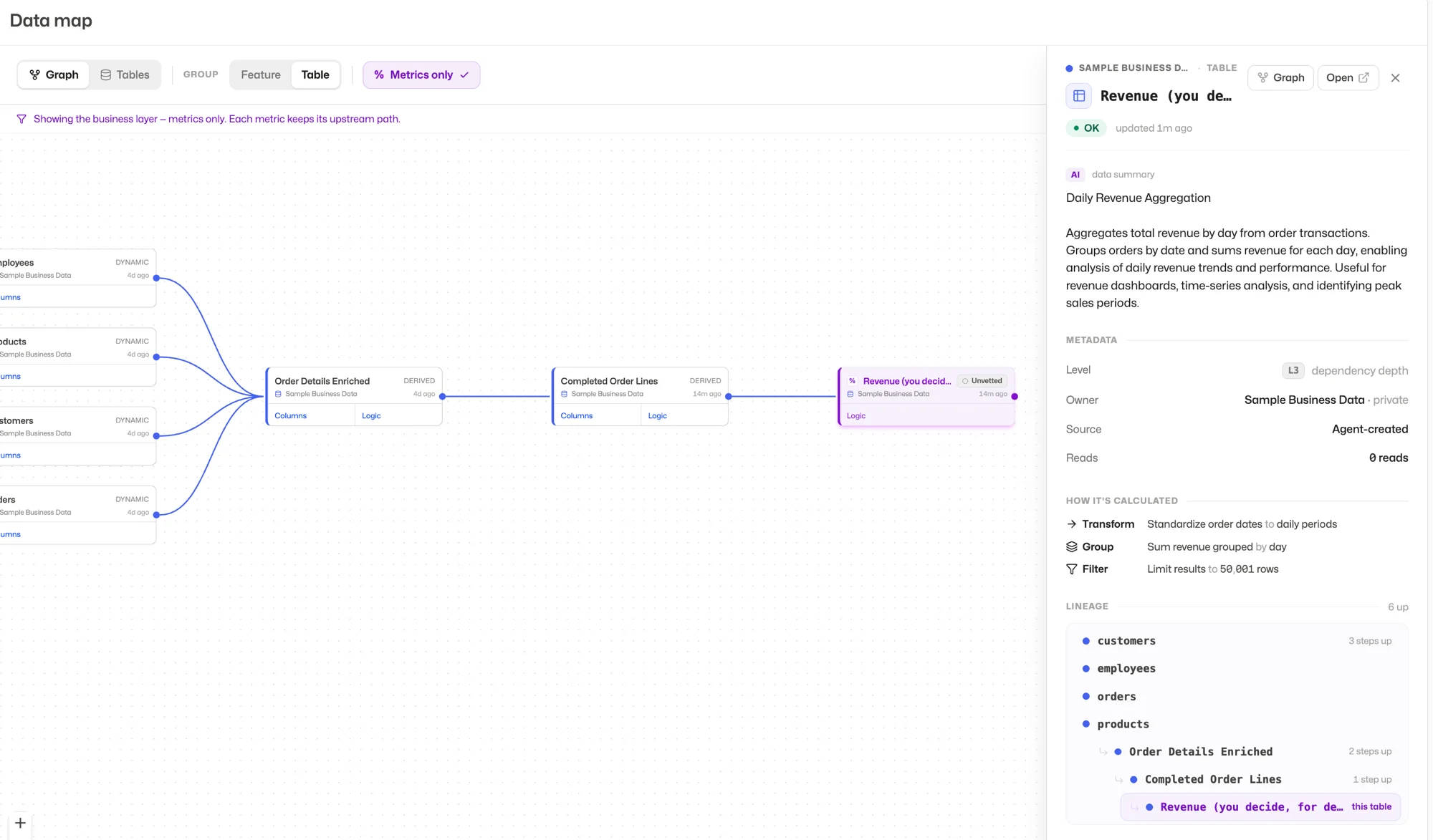
Why it matters: Traceable to source, down to the raw table. When someone challenges a number, you open its lineage instead of reconstructing a spreadsheet from memory.
A few more things
Ask by name
“What is our MRR?” I find the metric that matches and run its saved definition. Same question, same answer, whoever asks.
One definition, everywhere
Charts, reports, and automations built on a metric all run the same definition, so they agree by construction.
Slice without breaking it
Filter and break down freely. The definition holds, so the number stays right in every cut.
That is Metrics: the numbers you repeat, defined once, verified by your team, and traceable to source. Pin down the one your team debates most, and the debate is over.
The rest of July is already in motion. More soon.
Ronja works
This release is about me doing more of the actual work, not just answering your questions.
You can now tell me how to approach something, explore a “what if” without messing up your main train of thought, and, the big one, build things that keep running on their own after you walk away. Less “show me a chart,” more “handle this for me.”
And there is a bigger shift underneath it. The data lake brought your systems together so you could see the whole business at once. It also quietly showed you the gaps, the operational things no software actually holds. This release lets me fill them.
June 2026
Stop wasting smart people
on robotic work.
Tell me how to approach the work, chase a side-question without losing your place, and let the things you build keep running on their own.
Real, operational apps, finally inside Ronja
The data lake showed you the whole business. It also showed you the gaps. This release fills them.
The data lake closed half the gap: I could finally understand your business, everything in one place, fewer arguments about whose number is right. But understanding is not doing, and acting still meant another tool, another login, or a spreadsheet kept by hand. So I started closing the other half, some of it deterministic and run exactly the same way every time, some of it reasoning through a task the way a colleague would.
To run things rather than do them once, an agent or a data app needs to hold its own state: what is in progress, what changed, what comes next. A note is fine for light context, but not when it is business-critical or full of numbers that must stay correct. That is what this release adds: a real operational database inside your company that I set up, structure, and write to as the work happens. It makes my agents and your data apps stateful, and puts understanding and doing in the same place. The app that shows you what is happening is the one you act in.
This is what unlocks internal micro-apps. Every business has gaps where work happens but no software lives, too small to buy a tool for and spread across domains no single tool covers. AI made writing the software cheap. The hard part is everything around it: deeply integrated with your data, tailored to how you work, kept secure and maintained over time. That is the part I handle.
The internal micro-apps that were always missing
Every company has a spreadsheet that is secretly running something important. Who owes what and what is overdue. Approvals sitting in someone’s inbox. The list of issues being worked through. It works, just barely, until the one person who owns it is on holiday.
And even when it works, that data is stranded. It never reaches the lake, so the thing quietly running part of your business stays invisible to analysis.
These never became real software because they were too small to buy and too specific to fit. Now they can. I stand each one up, connected to your data from day one, and keep it running, so it both does the work and shows up in the picture.
Why it matters: This is the difference between a colleague who reports back and one who runs the thing. No new tool, no engineer: I set it up and keep it running. If your team tracks something in a spreadsheet because no tool quite fit, that is the first thing I would point this at.
Tell me how to approach the work
Some questions are quick. Others are big, layered problems that need real digging. Now you choose, right at the start.
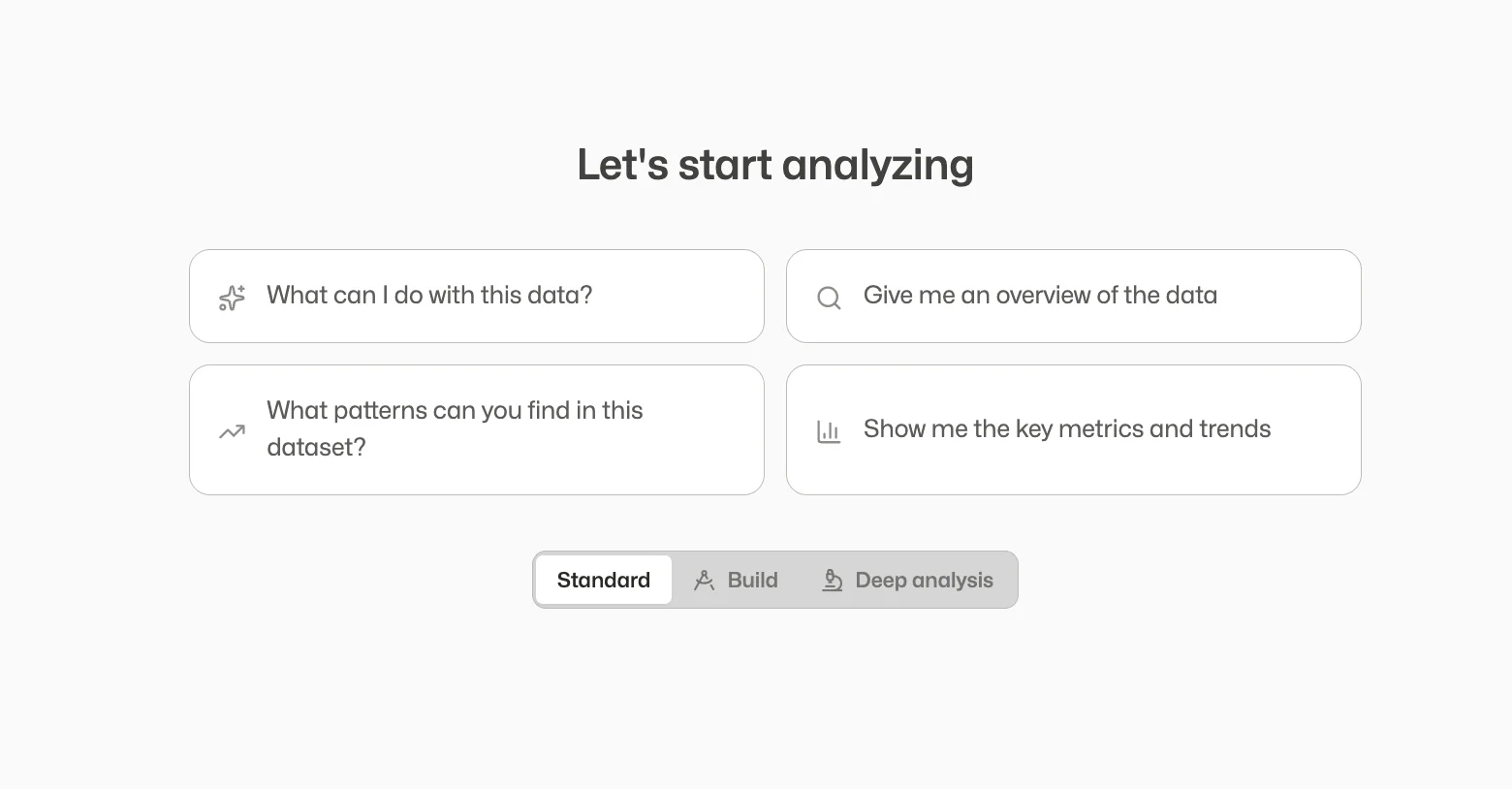
Standard
The everyday setting. Ask me anything and I’ll get you an answer, and it’s also where we roll up our sleeves: pull in a new data source, update something, set up a task that runs on its own. This is where most of your work happens.
Deep Analysis New
For the big, multi-step questions where there’s no single number to look up and the answer has to be pieced together. Instead of grabbing the first answer that looks good, I slow down: I write out what we’re trying to learn, work through it step by step, and pressure-test the answer before handing it to you. Great for the questions you’d otherwise hand to an analyst for a few days.
Build
For when you already know you want to build something and just want to get started.
Why it matters: The hard, sprawling questions, like “why did this region slip three quarters running?” get worked through properly, not answered off the cuff.
Explore a “what if” without losing your place
Chase a side-thought as far as you like, then bring the useful part back without tangling your main thread.
Ever been deep in something useful, had a side-thought, like “wait, what would this look like without our biggest customer?” and been afraid to chase it in case you lose your thread? Now you can branch off into a side-conversation, follow that thought as far as you like, and when you’re done I’ll tuck a tidy summary of what we found back into the main one. Nothing gets tangled.
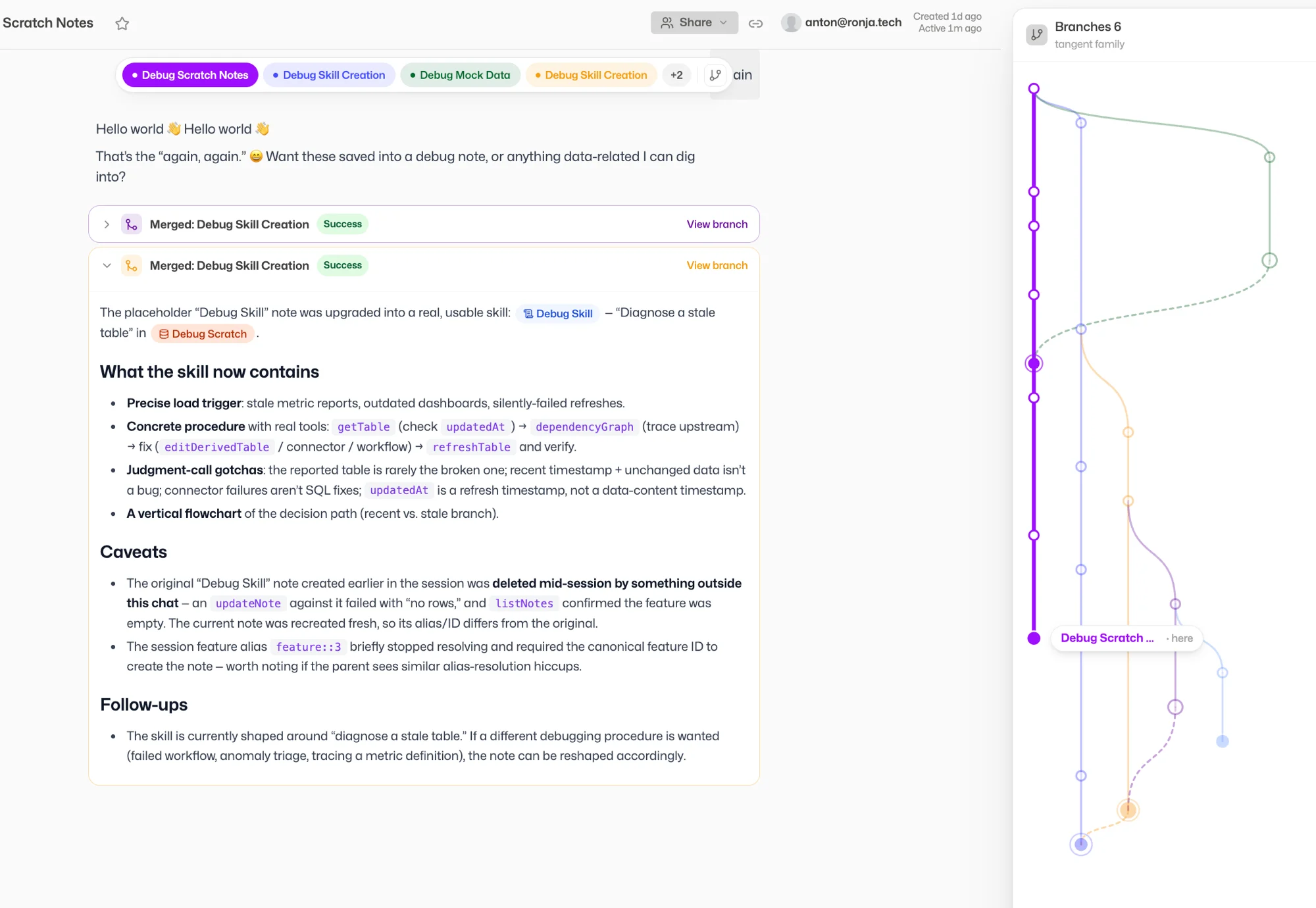
Why it matters: You can be curious without it being risky. Side-questions stay tidy, dead ends disappear, and the good findings come back with you.
Now in Microsoft Teams
I already work in Slack. Now I’m in Microsoft Teams too.
Message me directly or mention me in a channel and I’ll answer right there. If Teams is where your team already talks, you don’t have to come to me anymore. I’ll come to you.
Why it matters: One less tab. Ask me things in the chat tool you’re already in all day.
Ask “what is this?” about anything
Open a report or dashboard someone else built and not sure what you’re looking at?
There’s now an “Explain this” option on everything. Click it and I’ll tell you, in plain language, what it is and where the numbers come from. And while I’m building something for you, I now leave a plain note at each step saying what I just did.
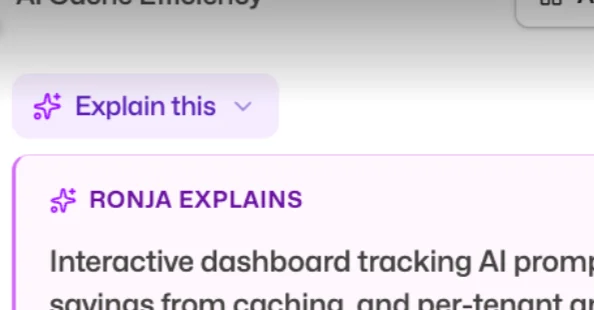
Why it matters: You don’t have to be the person who built something to understand it. Inherited a colleague’s dashboard? Just ask it what it does.
Getting set up got easier
Two small changes that take the friction out of getting started.
Connecting a new system is clearer
When you ask me to connect something, I now show you the options and point to the one I’d recommend, instead of quietly picking for you.
New colleagues join automatically
A super admin sets up your company’s email domain once under Organization, and anyone who signs in with a company address is added to your team automatically. No more sending invites one by one.
Smaller fixes
Big tables fit the screen
Big tables no longer get cut off at the edge. They fit the screen properly now.
Chart glitches fixed
Fixed a couple of chart glitches, including one that could make certain charts fail to load.
That’s June. Tell me how to approach the work, chase a side-question without losing your place, and find me wherever your team already works.
July is already in motion. More soon.
Ronja runs itself
In May, we made Ronja work without you.
Most AI agents fail for the same reason: they are blind. They see one system at a time, one conversation at a time, one slice of reality. They cannot act with full context because they do not have it.
May 2026
Ronja runs itself.
A data lake that consolidates everything. Integrations that read and write. Agents that act on the full picture. And a human-in-the-loop gate for when it matters.
Ronja starts from the opposite end. At its foundation, Ronja is a data lake capable of processing billions of data points. It builds its own integrations to your third-party systems, fetches data continuously, and consolidates everything into one queryable layer. Because those integrations are bidirectional, Ronja does not just read from your systems. She writes back. She triggers actions, sends messages, updates records, creates invoices.
That foundation is what makes real autonomy possible. Not agents guessing from fragments, but agents that search everything your organization knows, act on the full picture, and ask a human only when it counts.
Features
Everything that powers a business capability, kept running as one.
As you work with Ronja, you build things. Data connections, API integrations, dashboards, automated workflows, scheduled reports, data apps. Each one is useful on its own. Together, they make up a business capability. “Sales Intelligence.” “Customer Health.” “Marketing Performance.”
The hard part is not building them. It is keeping them running. As a capability grows, a change in one place can quietly break another, and anyone can alter how it behaves. A Feature draws a boundary around the whole capability, so it can be versioned, governed, and maintained as a single unit.
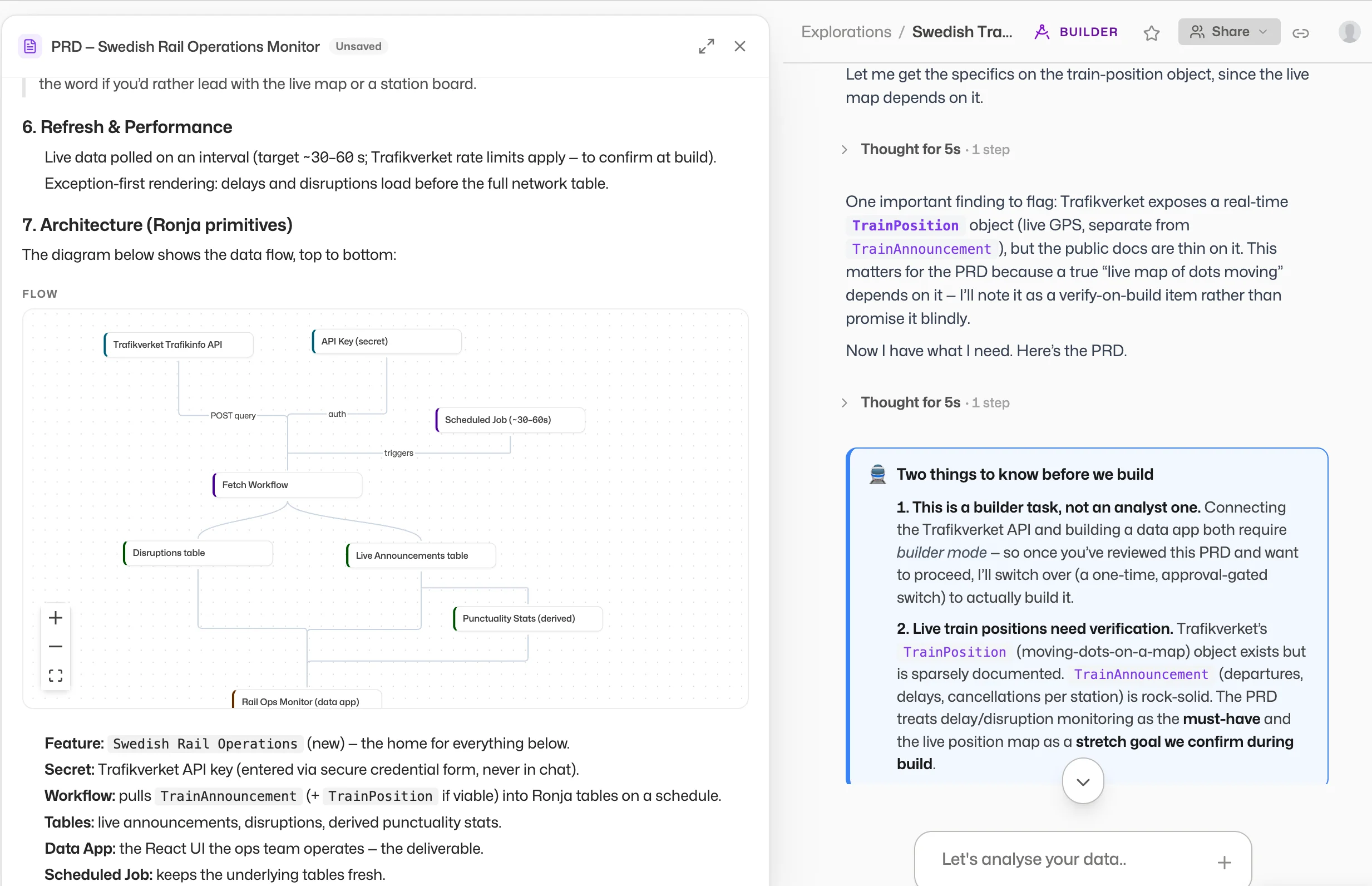
Change without breaking
Connections, workflows, dashboards, and data apps that serve one outcome live together, so you can see what a change touches before it ships, not after something breaks.
Control who changes behavior
Set who can edit a Feature once, at the boundary. Changes to shared work go through review before they go live, instead of anyone altering behavior unchecked.
Features are the container that keeps everything else maintainable. The primitives below, agents, automations, workflows, and data apps, all live inside a Feature, and inherit its versioning and access control.
Saved Agents
A new primitive, living inside a Feature. Build an agent once. Run it forever.
A Saved Agent packages a prompt, a model, approved tools, and declared data access into a single reusable unit. Because it sits on top of the data lake, it has access to everything. Because integrations are bidirectional, it can act on what it finds.
Full context, every run
The agent queries across your entire data lake. Not one table, not one system. Everything Ronja has consolidated from every connected source.
Read and write
Agents do not just find insights. They act on them: update a CRM record, send an email, post to Slack, trigger a workflow. The same integrations that bring data in also push actions out.
Locked configuration
Define the prompt, model, and tools once. Every invocation runs from the same locked configuration. No drift, no re-prompting, no surprises.
Automations 2.0
Scheduled Jobs are gone. Automations are here.
A unified Trigger + Action model where the action can be a workflow or a Saved Agent. Set a cron schedule, point it at an agent with full data lake access, and walk away.
Trigger + Action
Every Automation has a trigger (cron schedule) and an action (workflow or Saved Agent). Simple, composable, and easy to audit.
Agents on a schedule
Monday morning revenue summary. Wednesday pipeline health check. Friday churn risk scan. The agent searches the lake, finds what matters, and delivers it. Build once, automate forever.
Act, not just report
An automated agent can do more than send you a summary. It can update your CRM, flag overdue invoices in Slack, or trigger a follow-up workflow. The integrations are already there.
Workflows
The deterministic backbone. When you need guaranteed, repeatable output, workflows deliver it.
A workflow can run on a trigger, filter what comes in, fan out to a swarm of agents, propose a change, and pause for human approval before anything ships. End to end, it looks like this:
Email received
Filter & route
Proposes change

Human approves
Three upgrades this month:
Workflow types
Workflows are now typed: function, report, or pipeline. Easier to find, easier to organize, easier to hand off to a teammate.
Tables decoupled
Workflows no longer own tables. Tables are independent, first-class resources in the data lake. Cleaner separation of concerns and no more accidental data loss when a workflow is edited.
Agents can trigger workflows
A Saved Agent can invoke any workflow as part of its execution. The agent decides what to do; the workflow guarantees how it gets done.
Human-in-the-Loop Gates
Autonomous does not mean uncontrolled.
Workflows and agents can now pause mid-execution and wait for explicit human approval before taking critical actions. This is not a confirmation dialog. It is a software-enforced gate that blocks execution until a human signs off.
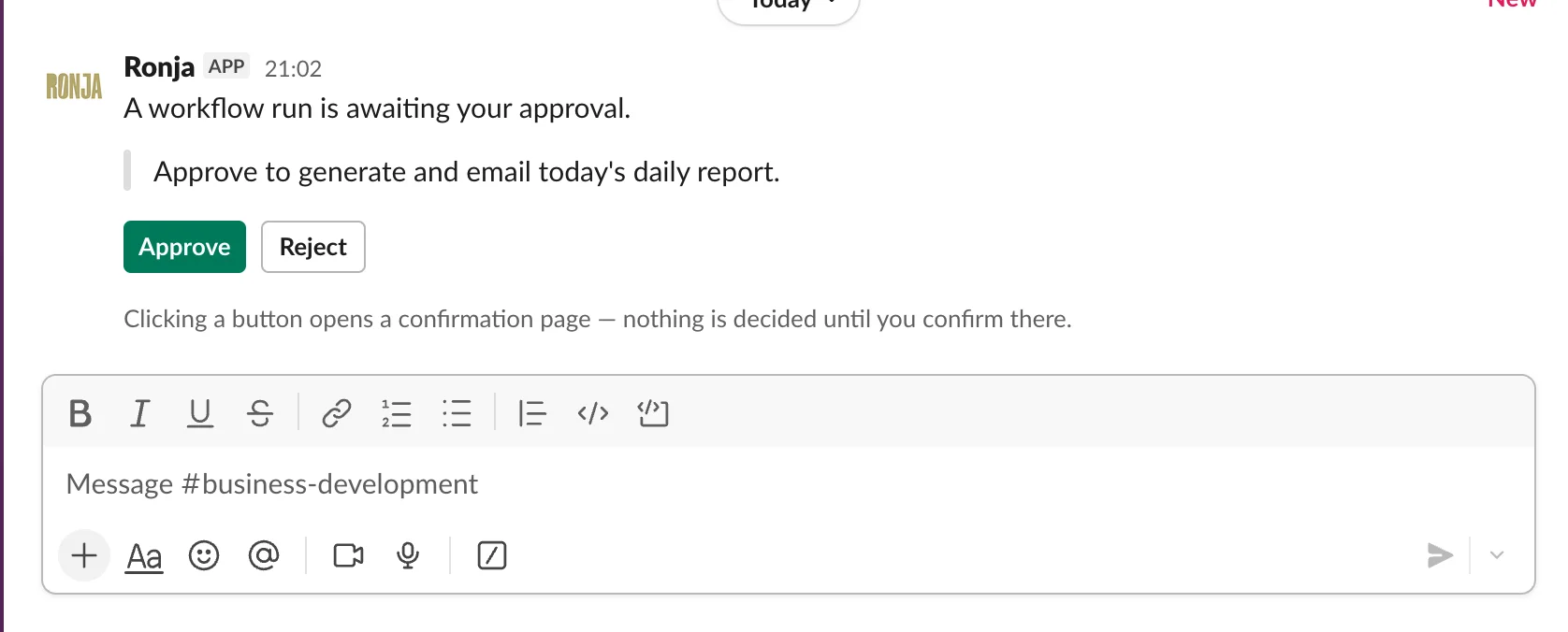
Software-enforced, not advisory
The gate blocks execution. The agent cannot proceed until a human approves. No bypass, no timeout override. The action does not happen without sign-off.
Multi-channel approval
Approve from wherever you are. The gate is channel-agnostic and ready for Slack, email, or in-app approval flows.
Data Apps
A dashboard, a tool, a presentation. Anything you can describe, with no limits.
A Data App can be a full dashboard, with none of the constraints of traditional BI. Describe how you want it to behave and Ronja builds it: a button that opens a new page, clicking one chart that filters every other, a row that drills through to its detail, a form that triggers a workflow. The things that are cumbersome or impossible in a BI tool are just a sentence here. And it is a real application, so it can be anything else an app can be, built directly on the platform with native access to data spread across all of your sources.
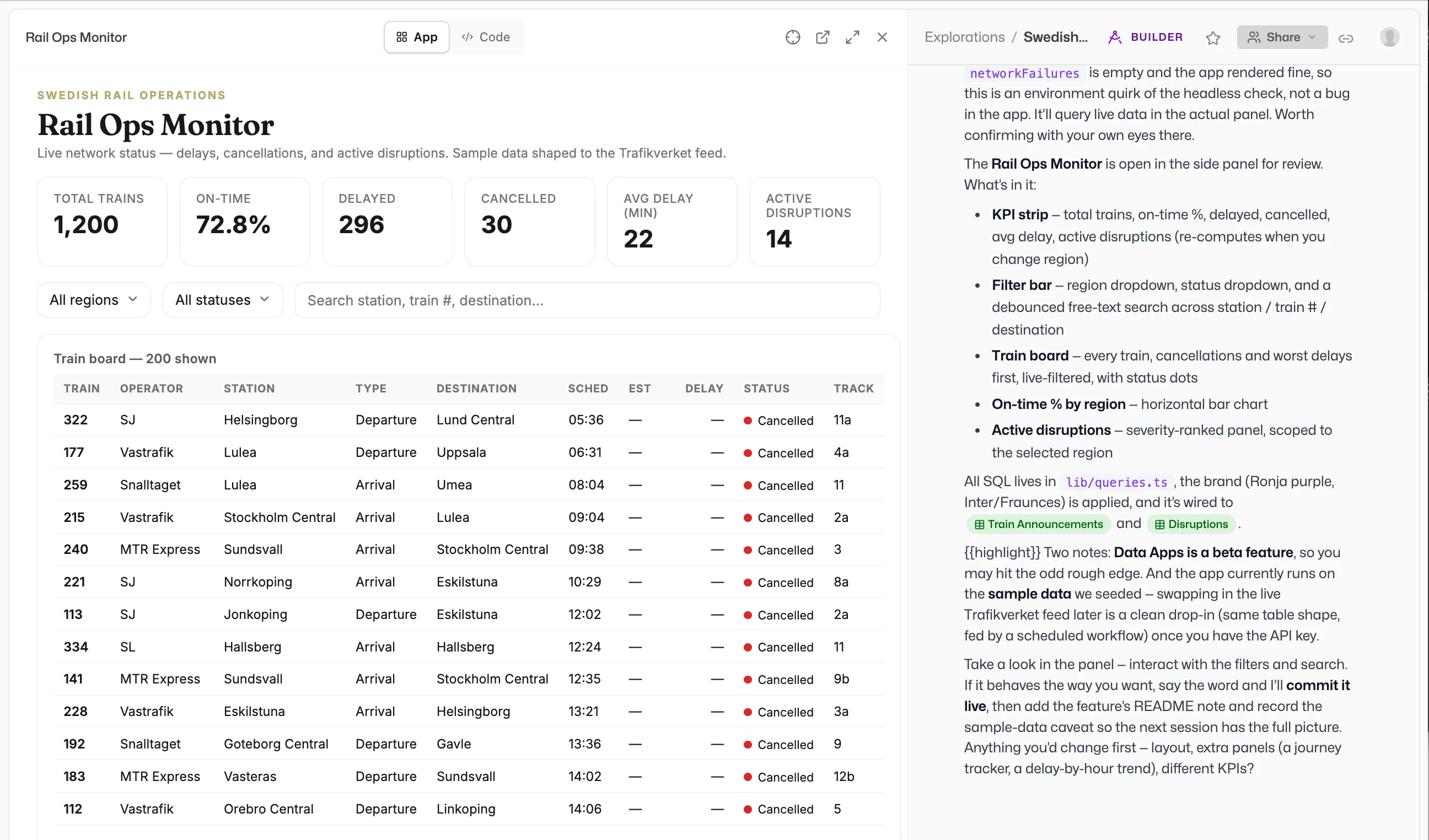
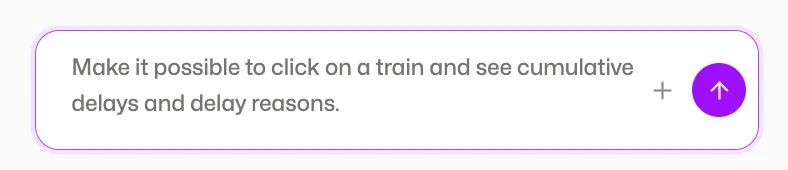
Describe the interaction
“Clicking this filters that.” “This button opens that page.” “This row drills through.” Say it in plain language and it works. No dashboard-tool gymnastics.
Wired across sources
Pull from every connected source at once. The app reads from the governed data layer directly, so what it shows is always live and traceable.
Governed and exportable
Submit an app for admin review before it goes live, and let users export to CSV or Excel from inside it. The same review pattern used for skills and workflows.
More from May
Session Tables v2
Ephemeral scratch tables that auto-promote to persistent when a workflow or automation needs them. No manual promotion step.
Microsoft 365 OAuth
Connect Outlook, OneDrive, Excel, and Calendar. Full OAuth flow, no manual token management.
Database connector sync + cron scheduling
Keep your connected databases fresh on a schedule. Configure sync frequency directly in the connector settings.
Activity Overview for admins
A new 5-tab admin view: Overview, Usage, Themes, Users, and Log. Everything you need to understand how your team uses Ronja.
Opus 4.8 with prompt-cache improvements
Faster responses on repeated context. Lower token costs on long-running agents and scheduled tasks.
Knowledge patch-editing
Edit organization knowledge memos with surgical precision. No more rewriting entire documents to fix one line.
In-app navigation
The back button now follows real browser history. Navigate the way you expect.
That is May. A data lake that consolidates everything. Agents that search across it all. Integrations that let them act on what they find. And a gate that keeps humans in control where it counts.
June is already in motion. More soon.
Built for teams
In March, Ronja learned to talk to anything. In April, we made it work for teams. Most AI tools today are single-player. Every employee connects their own tools, builds their own prompts, and starts from scratch. That approach breaks the moment you try to scale it. Cost, security, and consistency all fall apart at once.
April was about building the shared layer. One place where integrations are set up once and shared across the organization with granular access control. Where one employee’s correction contributes to the overall knowledge graph for the company, in a managed and auditable way. Where a workflow built on Tuesday runs identically on the first of every month. Where the knowledge graph converges toward the real, tacit knowledge of your business, crowd-sourced across every conversation, every correction, every definition.
Here is what shipped.
Workflows
LLMs are probabilistic. Your monthly revenue report should not be.
Workflows turn any analysis into re-runnable code that guarantees the same output every time. You built a report that looks and reads exactly right? Save it as a workflow. It will look and read exactly right next month, and the month after that.
Re-run any time
Pull this month’s report. Or last month’s. Or any month’s. Same structure, same formatting, same logic.
Parameterized inputs
The same workflow serves different teams, regions, or time windows.
Scheduled
Run weekly, daily, or quarterly. Set it once and forget it.
Draft, diff, publish
Edit as a draft, see what changed, publish when ready. Roll back instantly if something regresses.
Dedicated compute
Long-running jobs can opt into more memory and no time limit.
Durable assets
What used to be a one-shot script is now a re-runnable resource your whole team can rely on.
Connect to Anything
Ronja can now connect to any third-party service.
If it has API documentation or an MCP server, Ronja will connect to it. Instantly. Point Ronja at a service, walk through setup conversationally, and it becomes available to every future conversation. Combined with one-click OAuth for services like Notion, HubSpot, and Fortnox, time-to-connect is now measured in seconds.
Because integrations are managed centrally, they are set up once and shared across the organization, with full control over who can access what and whether access is read-only or read-write. No more fragmented setups where every employee connects to every tool independently.
Scheduled Jobs
The redesigned Scheduled Jobs page answers “is the Monday report broken or just running late?” at a glance.
Timeline view
Every past and upcoming run on one rail, with a “now” marker and color-coded health.
List view
Surfaces what runs next and what needs attention.
Email on failure
Per-job alerts. No more silent breakage.
Privacy controls
Mark a job as private to its creator.
Memory between runs
Each scheduled job carries a private notebook Ronja writes to, so context flows week-over-week.
Run history
Lifetime stats, paginated and sortable.
Approval Gates
Some actions move real bytes. Those now pause and ask first.
When Ronja wants to take an action that affects something outside the chat, like sending an email, creating a workspace, or modifying data, an approval card appears. Approve, reject, or rephrase. Rejections become feedback Ronja adjusts to.
Governance and Review
Skills, credentials, and workflows now have a proper review lifecycle built for teams.
Personal, pending, shared
Anyone can build for themselves. An admin reviews before sharing across the organization.
Edit drafts
Changes to a shared skill go through review before going live.
Pending inbox
Admins see every promotion request, edit, and approval in one place.
Cascade preview
See impact before you archive a secret or delete a skill.
Audit log
On every skill, secret, workspace, user, and token.
Skills That Scale
Build a skill once, share it with everyone.
Skills are now organizational procedures: reusable, version-controlled, and improvable through change requests. When one team member builds a better way to pull pipeline data or format a customer briefing, that procedure becomes available to every conversation across the organization. No more starting from scratch. No more twenty people solving the same problem twenty different ways.
Combined with the governance layer, skills flow from personal experimentation to team-wide standard through a clear review process.
Shared Knowledge, Crowd-Sourced
Every correction contributes to a knowledge graph the whole company benefits from.
Every correction, every definition, every KPI that any team member provides contributes to Ronja’s knowledge graph for the company, in a managed and auditable way. When one employee fixes a metric definition or clarifies a business rule, that improvement is available to everyone.
The knowledge base is not static documentation. It is a living graph that converges toward the real, tacit knowledge of your organization, built collectively, one conversation at a time.
Redesigned Chat
We rebuilt the entire chat experience around how people actually read what an agent is doing.
Thinking blocks
Working steps fold into a tidy summary. Charts and tables stay front and center. Intermediate steps tuck into a chip you can expand when curious.
Drill-in details
Click any tool result for a native view with full result tables, syntax-highlighted SQL, and inline schema.
Drop in PDFs and images
Drag a contract, an invoice, a chart, or a screenshot. Ronja sees it directly.
Instant messages
Your messages appear the moment you send them.
Admin Mode
Manage your workspace by chatting.
Admins now have a chat mode that unlocks workspace-management tools. Create workspaces, add or remove users, attach databases, all by chatting. Every mutation runs through the approval flow.
Dynamic Tables
Ronja is now a first-class data producer.
A new table kind: dynamic tables. Ronja writes to them directly, in append or replace mode. Any analysis the agent runs can become a durable, queryable, reusable dataset. Combined with workflows, this turns Ronja into a first-class data producer. It does not just read your warehouse, it contributes back to it.
Three New Flagship Pages
Home
Greeting, “Ask Ronja” hero, today’s activity, KPI tiles, jobs running now, recent explorations.
Account
Personal control center with tabs for identity, memory, skills, secrets, and open requests.
Dashboards Overview
Pin favorites. Templates one-click into a new draft.
Also New
Knowledge tree view
Tabs keep multiple memos open. A copilot sidebar follows as you read. Highlight text and click “Add to copilot” to pull it into your next prompt.
Onboarding wizard
An 8-step first-run experience that teaches Ronja’s concepts while learning about your business.
KPI chart type
Single-number metric cards with delta indicators, formatted as currency, percentage, or plain number.
Smarter tables
Group rows with aggregates, sticky totals, per-column alignment, continuous color scales, compact density toggle.
Star anything
Mark any object as a favorite for quick sidebar access.
Show in architecture
Jump from any table to its lineage graph.
Move tables between databases
No rebuild required.
Connector hardening
BigQuery, MySQL, and integrations all got more robust.
Google write scopes
Read-only by default. Write access escalated only when needed.
Our biggest release ever
150 changes. 3 weeks. Four major systems shipped: a skills and secrets framework that lets Ronja securely talk to any API or database just by having a conversation, a learning engine that makes Ronja smarter every time you use it, a visual system rebuilt from scratch, and an expanded set of first-class connectors with AI-guided setup.
Skills & Secrets
Infinite connectors. If a system has an API, Ronja can talk to it.








Ronja can now connect to any external system, not by writing code or configuring webhooks, but by having a conversation. This is not limited to our pre-built connectors. Any API, any database, any system with a programmatic interface is now within reach.
Skills are reusable knowledge documents that teach Ronja how to work with a specific tool or API. Secrets store your credentials securely with full OAuth 2.0 support. Your passwords and keys are never exposed to the AI.
Any API
Notion, Salesforce, Jira, Google Drive, your internal REST API. Teach Ronja once through a skill. It remembers forever. Every future conversation benefits automatically.
Any database
Query Postgres, Snowflake, BigQuery, SQL Server, Oracle, ClickHouse, and MySQL directly. No import needed. Ask a question, get results.
How it works: Just ask Ronja to do something, like "pull our Q1 revenue from Snowflake" or "grab the team roster from Notion". It figures out what it needs. If it needs credentials, it asks. If it needs to learn an API, you teach it once through a skill. The entire experience is a conversation.
First-Class Connectors
For data you want to keep in sync continuously, Ronja's connector ecosystem has expanded significantly.
AI-Guided Setup
Setting up a new connector used to mean filling out forms, looking up docs, and hoping you got the config right. Now you just tell Ronja what you want to connect to. An AI agent walks you through the entire process: it discovers available data, configures the connection, and lets you pick exactly which streams to sync.
Credentials are entered in a secure sidebar. The AI never sees your passwords or keys. If something goes wrong, the agent troubleshoots with you in real-time.
SharePoint New
Connect to SharePoint sites, browse document libraries, and select individual files or entire folders to sync. Supports CSV, TSV, Excel (multi-sheet), and Parquet files. Folder selections automatically include new files added later. Delta-based change detection means only modified files are re-synced.
MySQL CDC New
True change data capture via binlog streaming. Every insert, update, and delete is tracked in real-time. Initial snapshots run as parallel chunked queries writing directly to Parquet. Supports SSH tunnels and TLS.
HubSpot New
A new native connector replacing the Airbyte version. OAuth2 with PKCE, 15 CRM streams, 6 association tables, custom object support, and automatic scope introspection so you know exactly which permissions enable which data.
BigQuery Improved
Discovery is 10x faster with instant client-side search. Date-sharded tables (like GA4's events_YYYYMMDD pattern) are now natively supported with incremental per-shard sync.
Learnings
Ronja gets smarter the more you use it.
Every time your team builds a table, runs an analysis, or asks a question, Ronja is quietly learning. A new autonomous pipeline compacts these interactions into structured knowledge, including naming conventions, join patterns, metric definitions, and column usage, and integrates them into a growing knowledge graph organized around three pillars:
Org Context
Who uses what, how teams think about their data
Data Discovery
Where things live, how they connect, what's reliable
Metric Definitions
Agreed-upon formulas, endorsed by your team
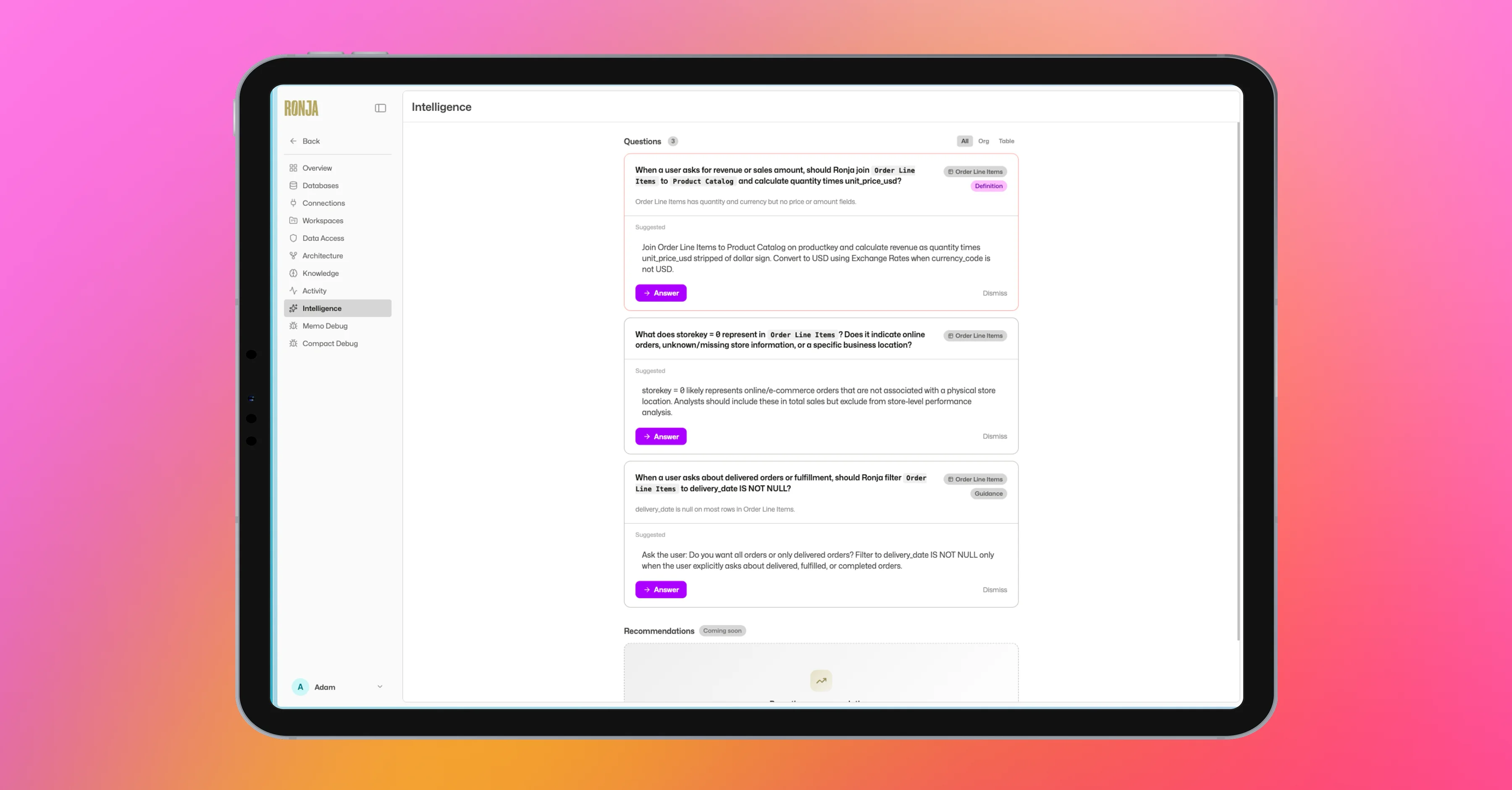
When the system detects ambiguity or knowledge gaps, it surfaces questions for your team to answer, with AI-suggested options so it's a quick click, not an open-ended task. Resolved answers flow back into the knowledge graph, making every future interaction more accurate.
Visit the new Intelligence page in Data Studio to see what Ronja has learned, review pending questions, and explore the knowledge graph.
Visual System v2
More beautiful charts, faster. The visualization engine has been rewritten from the ground up.
The new system produces cleaner, more polished charts. Gone are the quirky layouts and visual artifacts of the old renderer. Everything feels snappier.
Faster rendering
Charts load and respond noticeably quicker across all chart types.
Better looking by default
Cleaner axes, smarter labeling, more consistent styling across chart types.
Interactive
Data re-aggregates as you zoom, dual-axis combos, reference lines with fill regions.
First-class chart entities
Charts have their own detail pages, finetune overlays with a copilot sidebar, and one-click add-to-dashboard.
Auto-refresh dashboards
Charts automatically refresh when their source data changes.
Export everything
Chart/table toggle, image download, CSV export, and copy-link from every chart.
DuckDB SQL Engine
Tables can now be built using pure DuckDB SQL instead of Python.
Write SQL with dbt-style {{ ref('table') }} references to input tables, and Ronja handles the rest. DuckDB is the default engine for all new tables.
A cross-table query engine is also available in explorations: reference any table by ID and run ad-hoc queries across your entire data warehouse. AI agents generate DuckDB-native SQL with awareness of PIVOT, window functions, UNNEST, MAP extraction for nested structs, and more.
Architecture View
An interactive graph of your entire data pipeline.
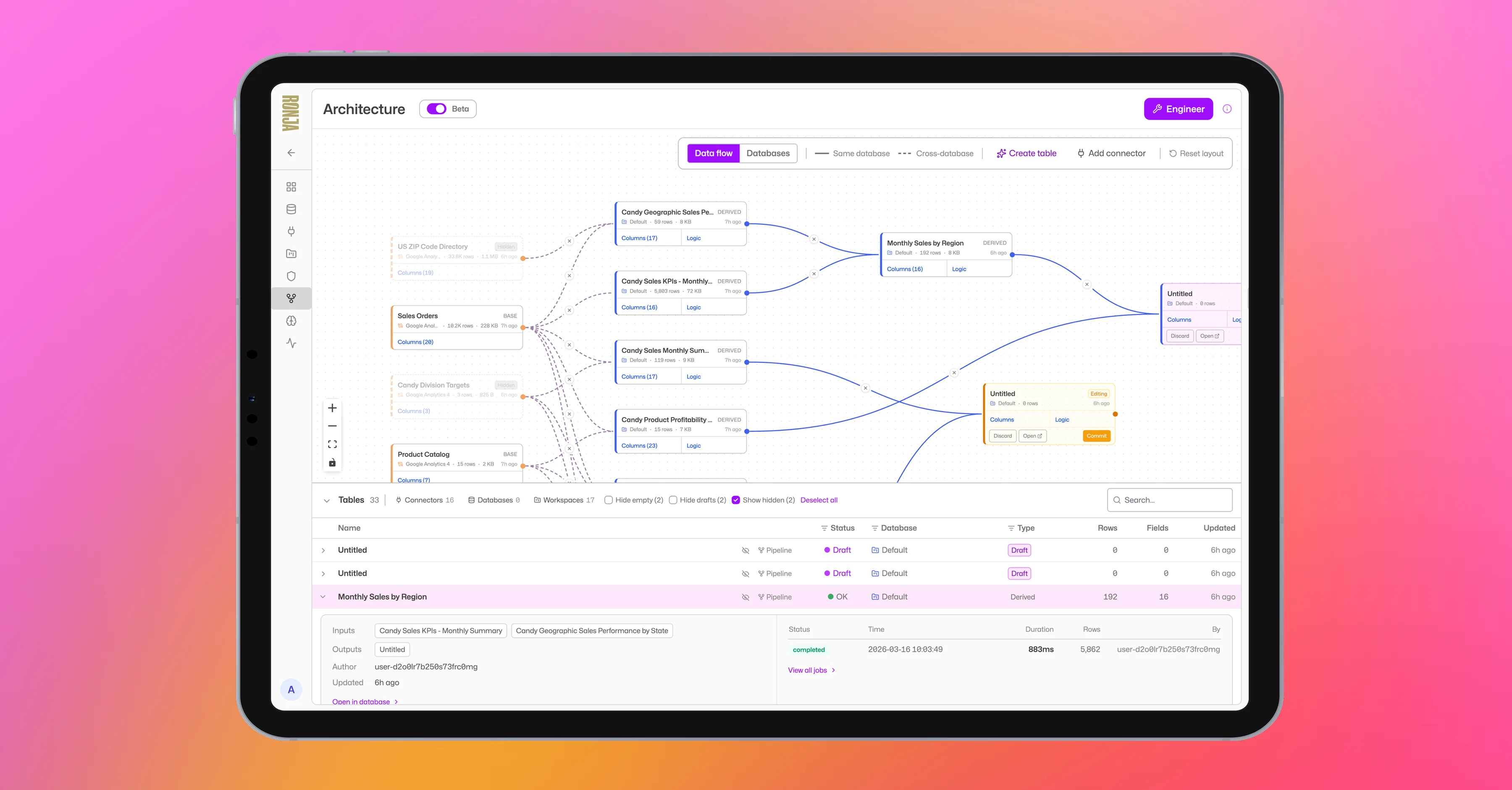
See every table, its columns, row counts, sizes, and dependency relationships at a glance. Toggle between Data Flow and Databases views. Filter and search across your whole landscape. Each database gets a unique color for instant visual grouping. Edit mode lets you reorganize tables between databases via drag-and-drop.
Activity Log
A unified view of everything happening in your workspace.
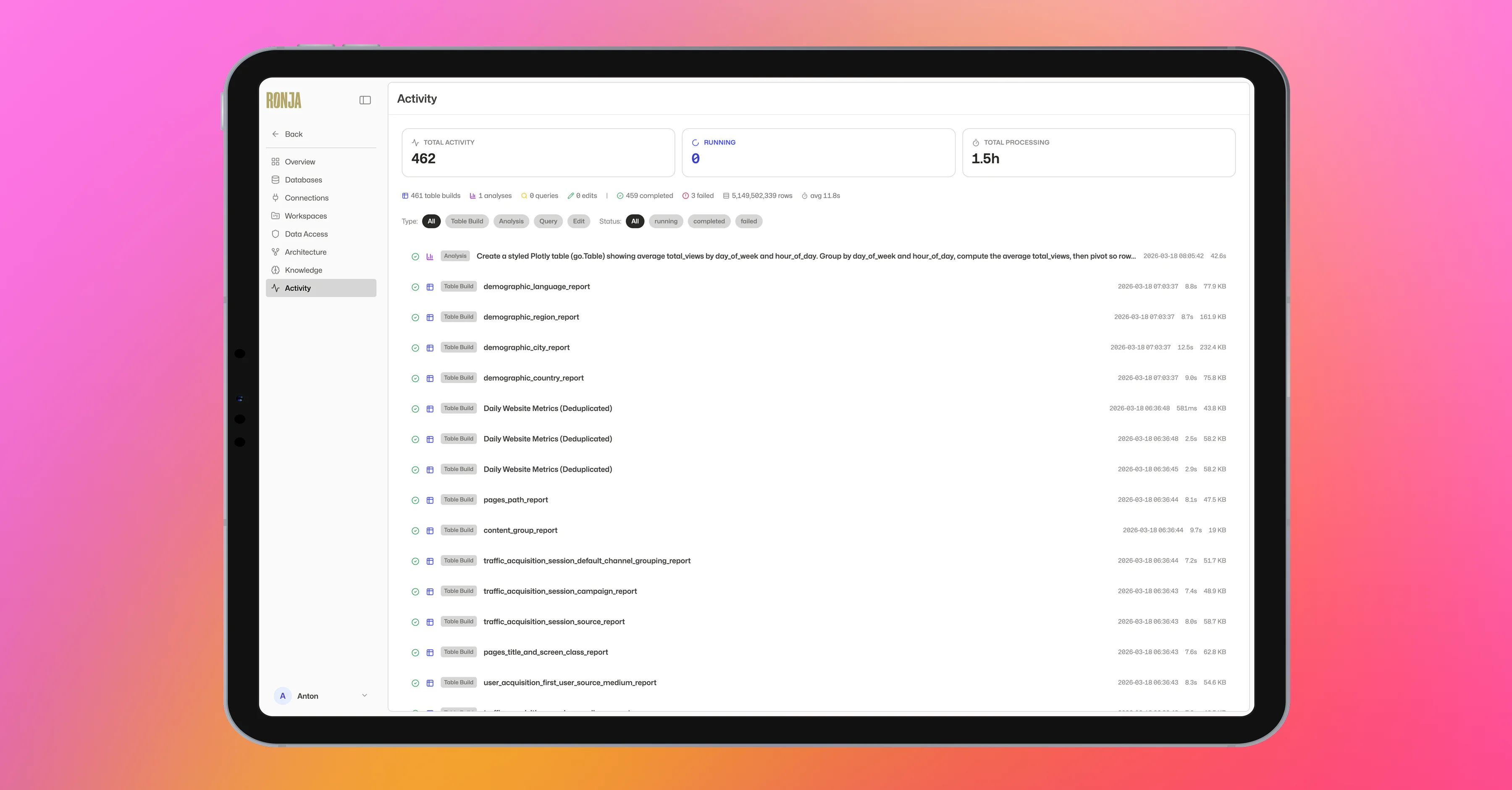
Every table build, analysis run, query execution, integration sync, and AI code generation, with aggregated stats, timing breakdowns, error messages, schema diffs, and direct links. Analysis edit history is preserved so you can always go back.
Also Shipped
File Uploads & Images in Chat
Upload CSVs, Excel files, and images directly into copilot sessions via drag-and-drop or paste.
Multi-Tab Dashboard Performance
Dashboards now build one tab at a time instead of all at once. Progressive results, no timeouts.
Workspace Admin Mode
One toggle to give all workspace members admin privileges within that workspace.
Download Options
Image and CSV export dropdown on every analysis card. Native tooltips replaced with instant popovers.
New User Onboarding
A choice modal on first sign-in: Quick Start with sandbox data, Connect Your Own Data, or Skip.